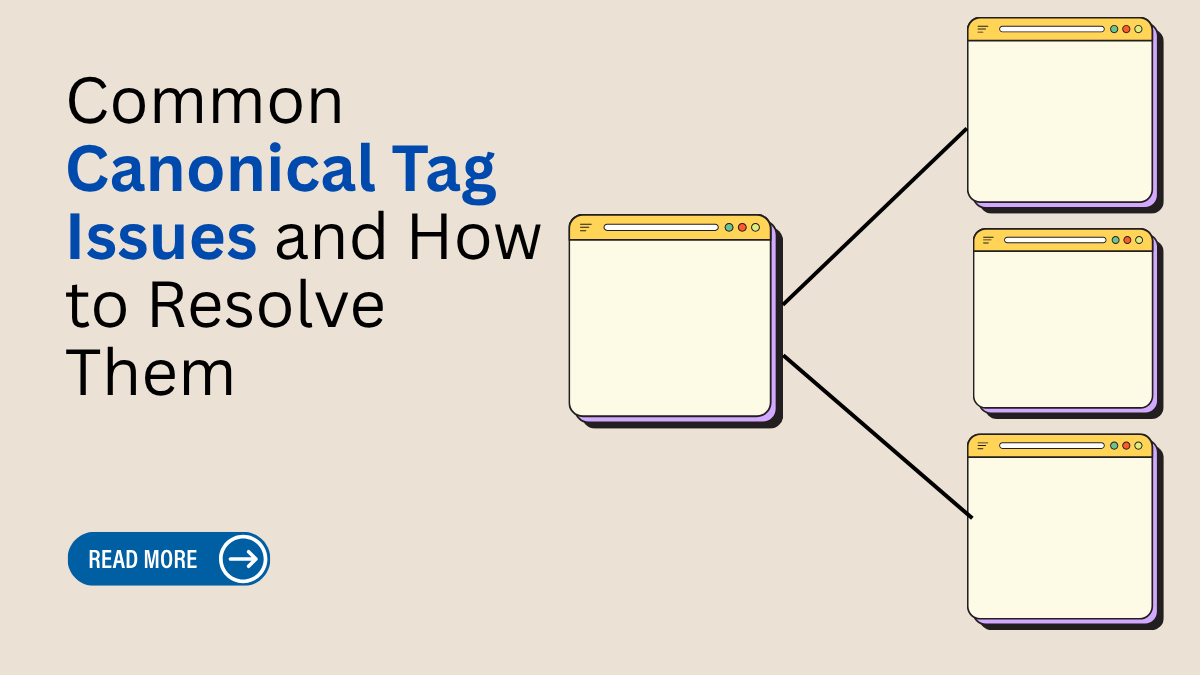
A website owner once noticed that their pages were slowly disappearing from Google search results, even after publishing high-quality content regularly. Traffic started dropping, product pages were competing against each other, and duplicate URLs began confusing search engines. After a detailed technical SEO audit, the real problem was discovered Common Canonical Tag Issues. Incorrect canonical URLs, duplicate content, pagination errors, and indexing conflicts were hurting the website’s SEO performance.
Today, canonical tags are an essential part of technical SEO, website optimization, and search engine ranking strategies. They help search engines understand the main version of a page and improve crawl efficiency. Fixing Common Canonical Tag Issues can strengthen organic traffic, improve website indexing, reduce duplicate content problems, and enhance overall SEO performance for ecommerce websites, blogs, and business websites. Ignoring duplicate content and improper canonical implementation are among the most Common SEO Mistakes to avoid, as they can confuse search engines, weaken rankings, and reduce your website’s organic visibility.
What is Canonical Tag?
A canonical tag is an HTML element that helps search engines understand which version of a webpage should be treated as the main or original page. Websites often have multiple URLs with similar or duplicate content, such as pages with tracking parameters, HTTP and HTTPS versions, or filtered product pages. A canonical tag tells search engines which URL should be indexed and ranked in search results. This helps avoid duplicate content problems and improves SEO performance. The canonical tag is placed inside the page’s HTML code and usually looks like this: <link rel="canonical" href="https://example.com/page/">. Using canonical tags correctly helps search engines crawl websites more efficiently, consolidate ranking signals, and improve website visibility. It is an important part of technical SEO and website optimization for better search engine rankings.
Most Common Canonical Tag Issues
Canonical tags are important for technical SEO, but many websites still face errors that affect crawling, indexing, and search rankings. These issues can confuse search engines and create duplicate content problems. Understanding the most common canonical tag issues helps website owners improve SEO performance and maintain proper website structure.
Missing Canonical Tags:
Some pages do not have canonical tags at all, which makes it difficult for search engines to identify the main version of a page. This can lead to duplicate content and indexing issues.
Incorrect Canonical URLs:
Sometimes websites point canonical tags to the wrong page, category, or homepage. This sends incorrect SEO signals to search engines and may reduce rankings.
Multiple Canonical Tags:
Having more than one canonical tag on a page confuses search engines because they cannot determine which URL is the preferred version.
Canonical Tags Pointing to Redirected Pages:
A canonical tag should always point directly to the final URL. If it points to a redirected page, search engines may ignore the canonical instruction.
HTTP and HTTPS Canonical Conflicts:
Some websites use HTTPS pages but still point canonical tags to HTTP versions. This creates duplicate content and security-related SEO problems.
WWW and Non-WWW Conflicts:
Using both WWW and non-WWW versions without proper canonical setup can split ranking signals and create duplicate indexing issues.
Pagination Canonical Errors:
Many ecommerce and blog websites incorrectly point all paginated pages to the first page, which may stop deeper pages from getting indexed.
Parameter URL Issues:
URLs with tracking parameters or filters often create duplicate pages. Without proper canonical tags, search engines may index unnecessary URL versions.
Canonical Loops:
A canonical loop happens when two or more pages point canonically to each other. This creates crawl confusion and affects indexability.
Cross-Domain Canonical Errors:
Incorrect cross-domain canonical implementation can cause search engines to prioritize the wrong website or ignore content completely.
Fixing these canonical tag issues helps improve crawl efficiency, indexing accuracy, duplicate content management, and overall SEO performance. Regular technical SEO audits and tools like Crawlhunt can help website owners quickly identify and resolve canonical-related problems.
Step-by-Step Guide to Finding and Fixing Canonical Tag Issues Using Crawlhunt
Canonical tag problems can negatively affect your website’s SEO performance, indexing, and crawl efficiency. By using advanced technical SEO tools like Crawlhunt, website owners can quickly identify duplicate content issues, incorrect canonical URLs, and crawl-related problems. Follow these detailed steps to analyze and resolve canonical tag issues effectively for better search engine rankings and website optimization. An On Page SEO Audit Report generated through tools like Crawlhunt can help identify canonical tag issues, duplicate content errors, and indexing problems to improve your website’s overall SEO performance and crawl efficiency.
Pricing: CrawlHunt keeps its pricing straightforward with three plans. The Basic plan is permanently free, the Growth plan is offered at $59/month, and the premium Scale plan costs $149/month, providing greater flexibility for larger SEO operations.
Step 1: Add a New Project in Crawlhunt

The first step in fixing canonical tag issues is setting up a new website project in Crawlhun. After logging into the platform, go to the dashboard and click on the “Add New Project” button. This section allows you to configure how the crawler will scan your website. Start by entering your website URL, such as https://example.com, so the system knows which domain to analyze. Next, choose how many pages you want the crawler to scan. You can select “All Pages” if you want a complete SEO audit or limit the crawl to a smaller number like 50 pages for testing purposes.
After that, configure the crawl schedule. If you want an immediate report, select “One-time only” and choose “Run Immediately.” You can also schedule the crawl for later if needed. Then configure the crawl policy settings carefully. Enable options like following all links, respecting robots.txt rules, and scanning sitemap.xml pages only. These settings help Crawlhun mimic how search engines crawl your website. Once everything is configured properly, click on “Create Project.” This launches the crawl process and starts collecting important SEO data from your website. Proper project setup is very important because it ensures the crawler gathers accurate information related to canonical tags, duplicate pages, redirects, and indexing signals.
Step 2: Run the Website Crawl
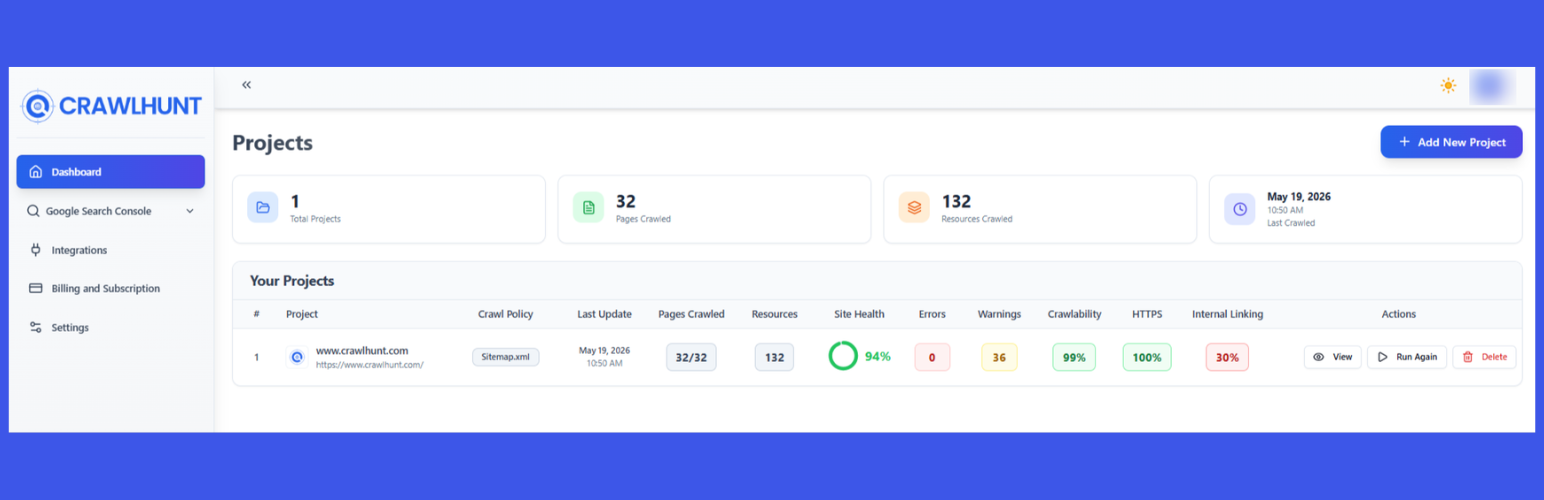
Once the project is created successfully, Crawlhun automatically begins crawling your website pages. During this process, the crawler scans your website structure the same way search engines like Google do. It visits each page, follows internal links, checks metadata, and analyzes technical SEO elements. This step is extremely important because canonical tag problems are often hidden deep inside product pages, filtered URLs, category pages, blog archives, or parameter-based links.
As the crawler moves through the website, it checks whether canonical tags are missing, duplicated, incorrect, or pointing to redirected pages. It also analyzes duplicate content issues, crawl depth, broken links, indexing directives, redirect chains, schema markup, and internal linking structures. Ecommerce websites especially benefit from this process because they usually have multiple URL variations caused by filters, sorting options, pagination, and tracking parameters.
After the crawl finishes, Crawlhun generates a detailed SEO report containing all identified issues. If you later make changes to canonical tags or other technical SEO settings, you can simply click the “Run Again” option to perform another crawl. This helps verify whether the problems were resolved successfully. Regular crawling is important because websites constantly change, and new canonical issues may appear after updates, redesigns, or plugin installations.
Step 3: Open the SEO Report Dashboard
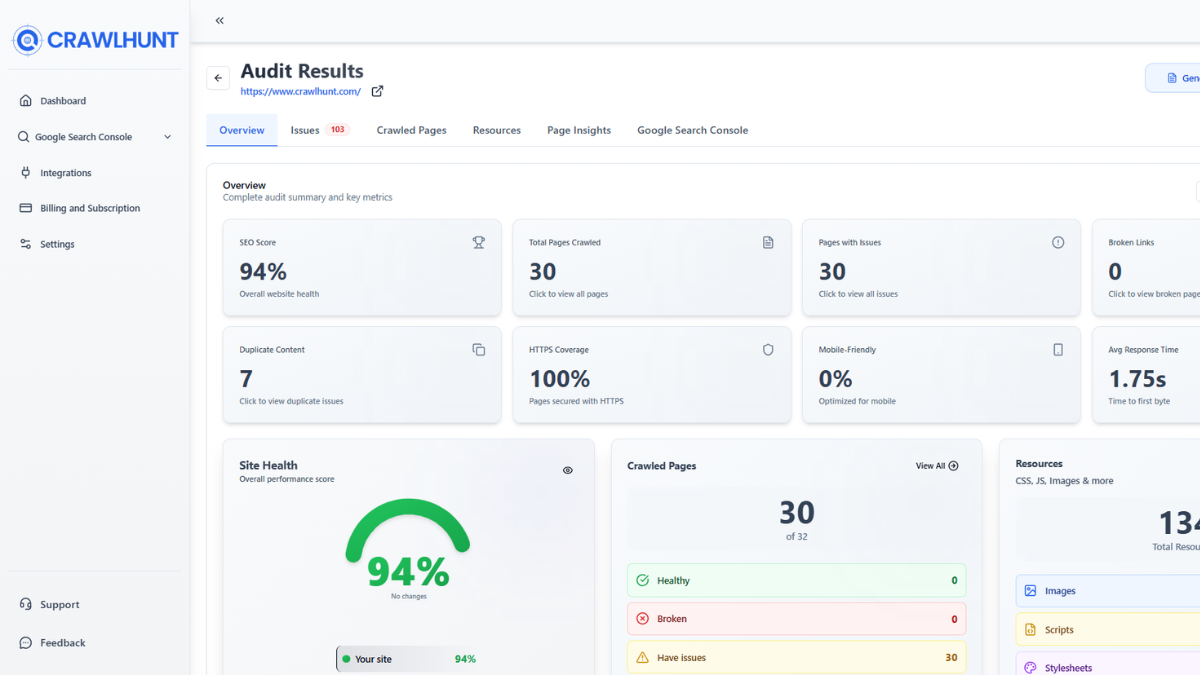
After the website crawl is completed, the next step is opening the SEO report dashboard by clicking on the “View” button. This dashboard acts as the main control center where all technical SEO information is displayed in an organized format. It provides a complete overview of your website’s SEO health and highlights critical errors affecting indexing and rankings.
Inside the dashboard, you will see several important sections, including Overview, Issues, Crawled Pages, Resources, Page Insights, and Google Search Console integration. The Overview section summarizes the website’s overall SEO condition and displays important metrics such as total pages crawled, detected errors, warnings, duplicate content issues, and crawl statistics. The Issues section categorizes technical SEO problems based on severity, helping you prioritize which errors should be fixed first.
The dashboard is extremely useful because it simplifies complex technical SEO data into an easy-to-understand interface. Instead of manually checking hundreds of pages, website owners can quickly identify patterns and locate pages with canonical conflicts. SEO professionals can use this report to monitor crawl efficiency, duplicate indexing problems, and website architecture. By reviewing the dashboard carefully, you can understand how search engines interpret your website and identify the exact areas causing SEO performance issues.
Step 4: Open Crawled Pages
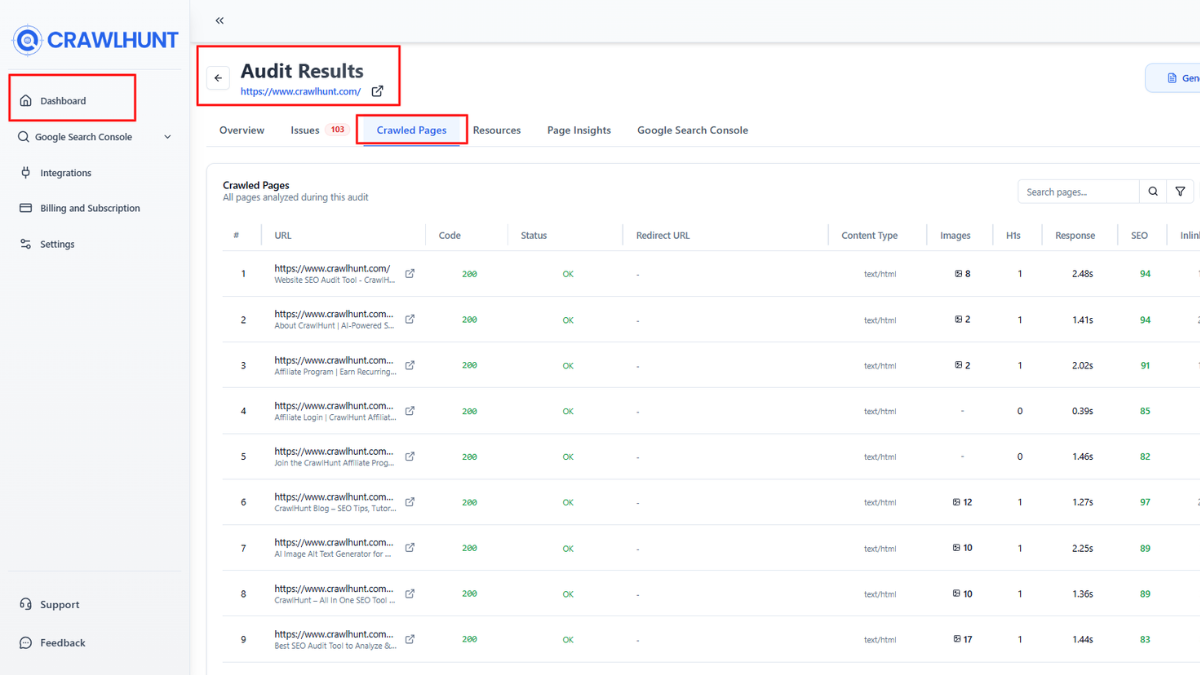
After reviewing the dashboard overview, click on the “Crawled Pages” section. This section contains a detailed list of every URL discovered during the crawl process. Each page includes valuable information such as status codes, indexability, canonical setup, redirects, metadata, crawl depth, and internal linking details. This feature helps website owners analyze specific pages individually and identify technical SEO problems quickly.
For websites with large numbers of pages, this section becomes extremely important because duplicate content and canonical problems often exist on only certain types of URLs. For example, ecommerce websites may have duplicate product pages caused by collection filters, while blogs may generate duplicate URLs through categories, tags, archives, or pagination. Crawlhun makes it easy to locate these problematic pages.
You can also use filters and search options inside the Crawled Pages section to find URLs with missing canonical tags, duplicate titles, or crawl issues. Reviewing this data carefully helps you understand how search engines access your website and whether important pages are being indexed correctly. It also helps identify low-quality or unnecessary URLs that may waste crawl budget and weaken overall SEO performance.
Step 5: Analyze URL Details
When you click on a specific URL from the Crawled Pages list, Crawlhun opens a complete page-level SEO analysis report. This detailed report contains several sections designed to provide deeper technical insights about that page. These sections include URL Details, Inlinks, Outlinks, SEO, Redirects, Canonical, and Schema data.
The URL Details section displays important page information such as status code, page title, meta description, indexability status, and crawl response. Inlinks show which pages internally link to the selected URL, while Outlinks display outgoing links from that page. These sections help evaluate website structure and internal linking efficiency.
The Redirect section highlights whether the page redirects somewhere else or contains redirect chains that may affect SEO. Meanwhile, the Schema section checks structured data implementation, which helps search engines better understand page content. However, the most important section for canonical optimization is the Canonical tab. Here, you can verify whether the page contains a canonical tag, whether it is self-referencing, and whether it points to the correct preferred URL. This detailed analysis allows SEO professionals to diagnose the exact reason behind duplicate indexing or ranking issues.
Step 6: Review the Canonical Tag Report
Inside the Canonical section, Crawlhun provides a complete breakdown of the page’s canonical implementation. This report is designed to help website owners quickly identify common canonical tag problems that may affect search engine indexing. The tool displays whether a canonical tag exists on the page and shows the exact canonical URL being referenced.
The report also compares the page URL with the canonical URL to determine whether they match correctly. If the page uses a self-referencing canonical, Crawlhun labels it as a recommended setup because self-referencing canonicals help search engines understand that the current page is the preferred version. The tool may also highlight issues such as missing canonical tags, multiple canonical tags, canonical loops, or canonicals pointing to redirected or non-indexable pages.
For example, the report may display information like this:
Page URL
Canonical
Self-Referencing Canonical
This page points to itself as the canonical version.
This detailed reporting system makes technical SEO analysis much easier, especially for large websites with thousands of URLs. Instead of manually inspecting source code, users can quickly identify canonical problems from one centralized dashboard
Step 7: Replace Incorrect Canonical Tags
If Crawlhun identifies any canonical-related issues, the final step is fixing them properly. Incorrect canonical tags should be replaced immediately because they can cause duplicate content problems, crawl inefficiencies, and ranking losses. For example, some pages may incorrectly point canonicals to the homepage, old URLs, redirected pages, or unrelated category pages. These mistakes confuse search engines and weaken SEO performance.
The best practice is to use self-referencing canonical tags on important indexable pages. A correct canonical implementation looks like this:
<link rel="canonical" href="https://example.com/page/">
This tells search engines that the current URL is the primary version that should be indexed and ranked in search results. After updating the canonical tags, it is important to rerun the crawl in Crawlhun to confirm that the issues have been fixed successfully. The updated report will help verify whether search engines can now interpret the website structure correctly.
Proper canonical optimization improves crawl budget management, prevents duplicate indexing, consolidates link equity, and strengthens overall technical SEO performance. Regular monitoring and auditing ensure that new canonical problems do not appear after website updates, CMS changes, or plugin modifications.
Conclusion
Canonical tags play a major role in technical SEO and website optimization. If Common Canonical Tag Issues are ignored, they can create duplicate content problems, reduce crawl efficiency, weaken search engine rankings, and affect organic traffic growth. Problems like missing canonical tags, incorrect URLs, pagination conflicts, and HTTP/HTTPS errors can confuse search engines and impact website indexing. By regularly performing SEO audits and monitoring website structure, businesses can improve crawlability and strengthen their overall SEO strategy. Proper canonical implementation helps search engines identify the main version of a page and consolidate ranking signals effectively.
For ecommerce websites, blogs, and business websites, fixing Common Canonical Tag Issues is essential for better search visibility, higher Google rankings, improved user experience, and long-term digital marketing success. Strong technical SEO practices always lead to better website performance and sustainable organic growth.
Frequently Asked Questions (FAQs)
How do canonical tag problems affect SEO?
Canonical tag problems can create duplicate content issues, reduce crawl budget efficiency, split ranking signals, and confuse search engine crawlers. This may lead to lower Google rankings, indexing issues, poor user experience, and reduced organic search traffic for websites.
What is a self-referencing canonical tag?
A self-referencing canonical tag points back to the same page URL. It tells search engines that the current page is the preferred version for indexing. Self-referencing canonicals are considered a best practice in technical SEO and help maintain proper indexing signals.
Can canonical tags fix duplicate content completely?
Canonical tags help manage duplicate content, but they are not always a complete solution. In some cases, redirects, proper URL structures, internal linking optimization, and crawl management may also be required to fully resolve duplicate content and indexing problems.
How often should canonical tags be audited?
Websites should perform regular technical SEO audits to monitor canonical tags and indexing health. Ecommerce websites should ideally check canonical implementation monthly, while blogs and business websites can review them quarterly or after major website updates, migrations, or redesigns.