
Images enhance visual appeal and help visitors grasp information more quickly, whether through product photos, blog visuals, or graphics. However, one often overlooked detail is alt text, which plays a key role in both SEO and accessibility. Without it, search engines struggle to interpret image content, reducing visibility in image search results. Using an AI image alt text generator makes it easier to create accurate, descriptive alt text at scale, improving both search performance and user experience.
Writing alt text for every image can also feel like a long and repetitive task, especially when a website has hundreds of images. This is where an image alt text generator becomes useful. It helps create meaningful image descriptions automatically. With the help of smart tools like Crawl Hunt, missing alt text can be detected and optimized quickly, helping websites improve SEO and accessibility at the same time.
What is Alt Text?
Alt text, also called alternative text, is a short description added to an image on a website. It helps search engines and screen readers understand what the image is about. When someone cannot see the image, the alt text explains the content in words. This is especially helpful for people who use screen readers because of visual impairments.
Alt text is also important for SEO because search engines like Google cannot see images the way humans do. They read the alt text to understand the image and its context on the page. Good alt text clearly describes the image and sometimes includes relevant keywords naturally. It should be short, simple, and meaningful so both users and search engines can easily understand the image content.
Why Alt Text is Important?
Many website owners underestimate the importance of alt text, but it plays a crucial role in both technical SEO and accessibility compliance. Adding descriptive alt attributes helps search engines understand images while also improving the user experience.
Here are the main reasons why alt text is important.
1. Improves Image SEO
Search engines like Google use alt text to understand what an image represents. When images have proper descriptions, they can appear in Google Images search results, bringing additional organic traffic. Using an AI image alt text generator ensures images contain relevant keywords and meaningful descriptions that help improve visibility in image search. Ignoring image alt text is one of the Common SEO Mistakes to Avoid, as it directly impacts both search visibility and website accessibility.
2. Improves Website Accessibility
Accessibility is an essential part of modern web design. Users with visual impairments rely on screen readers to navigate websites. When images have proper alt text, the screen reader can describe the image content. Without alt text, screen readers simply skip the image, which can reduce the overall user experience. You can enhance accessibility efficiently by using an ai alt text generator to automatically create accurate and descriptive alt text for images, ensuring screen reader users don’t miss important visual content.
3. Helps Search Engines Understand Page Content
Images often support the main topic of a page. Alt text helps search engines understand how the image relates to the page content. This improves topical relevance and strengthens overall SEO signals. For example, an image on a product page with descriptive alt text helps search engines understand product features. Using an alt text generator can help create accurate, keyword-rich descriptions for images, making it easier for search engines to understand their context and improve the page’s overall SEO relevance.
4. Improves Website Performance Signals
Missing alt text can sometimes indicate poor SEO optimization. Websites with well-structured content, optimized images, and proper alt tags tend to perform better in search rankings. An AI image alt text generator can automatically generate optimized descriptions across an entire website, improving technical SEO signals.
5. Helps When Images Fail to Load
Sometimes images fail to load because of slow connections or technical issues. In such cases, the alt text appears in place of the image. This helps users understand what the image represents, even when it is not visible.
6. Improves Content Context
Alt text helps search engines connect images with surrounding content. This improves content context and strengthens keyword relevance for the page. By using an AI image alt text generator, website owners can ensure that every image has meaningful and optimized descriptions that support the overall content strategy.
How Crawl Hunt Helps in Writing Alt Text?
Many websites contain hundreds or thousands of images. Manually reviewing each image to check for missing alt text can be time-consuming. This is where tools like Crawl Hunt become extremely useful. Crawl Hunt is a powerful Shopify SEO app that scans your website and identifies technical SEO problems. One common issue it detects is missing image alt text.
When images do not have alt tags, they can hurt both accessibility and SEO performance. Crawl Hunt solves this problem by detecting missing alt attributes and generating optimized descriptions using AI.
What is Crawl Hunt?
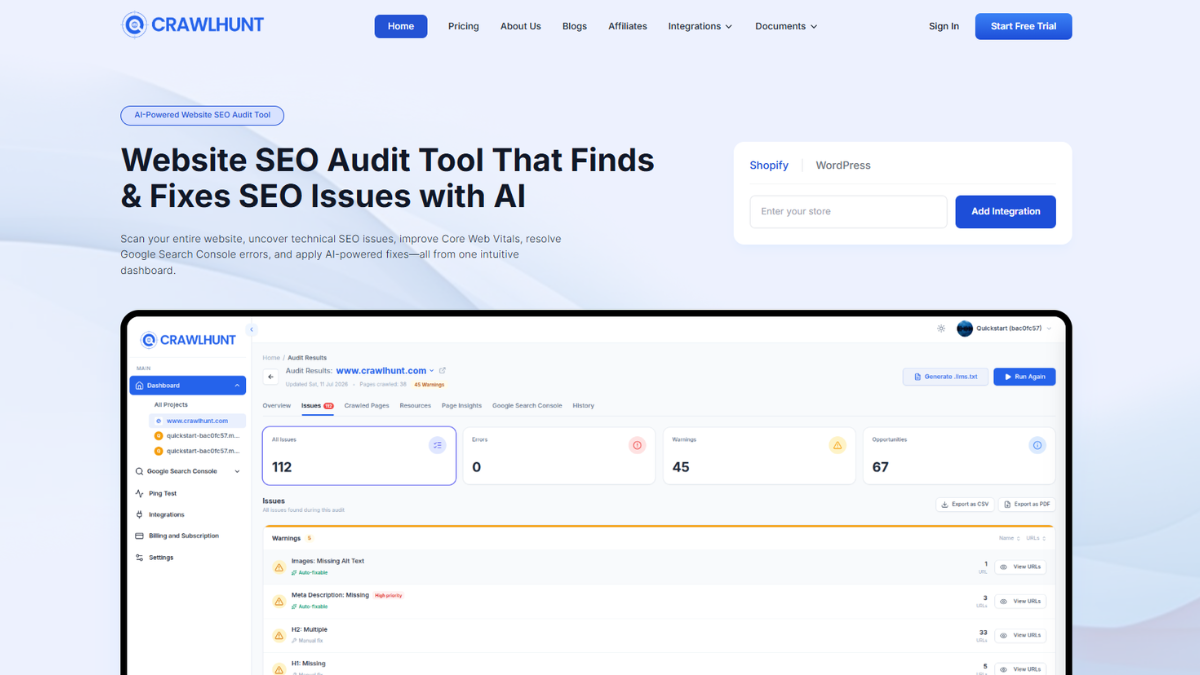
Crawl Hunt is a powerful Shopify SEO tool that helps store owners improve their website’s visibility on search engines like Google.
The tool scans your Shopify website and identifies SEO issues that may impact rankings, including:
- Broken links
- Missing meta tags
- Duplicate content
- Slow-loading pages
- Image optimization problems
After scanning the website, Crawl Hunt provides clear suggestions to fix these problems and improve overall SEO performance.
CrawlHunt Pricing Plan: CrawlHunt offers three SEO pricing plans designed for different business sizes. The Basic plan is free forever ($0), the Growth plan costs $59/month, and the Scale plan is priced at $149/month, making it suitable for businesses that need more advanced SEO management.
It also helps improve:
- Technical SEO
- Structured data
- Mobile usability
- Site speed
- Website crawlability
By identifying hidden SEO issues and providing optimization recommendations, Crawl Hunt helps websites gain more organic traffic and improve search engine rankings.
AI-Powered Alt Text Generation
One of the most useful features of Crawl Hunt is its AI image alt text generator. When the tool detects images without alt tags, it automatically generates optimized descriptions based on the image content.
- This AI feature helps website owners:
- Save time on manual optimization
- Improve accessibility compliance
- Strengthen image SEO signals
- Fix missing alt attributes quickly
Instead of manually reviewing every image, the AI image alt text generator analyzes images and generates meaningful descriptions that search engines can understand.
For Shopify store owners managing large product catalogs, this feature is especially helpful because it ensures every product image has optimized alt text.
Missing Image ALT Text
Images without alt attributes create accessibility and SEO problems. Crawl Hunt identifies these missing alt tags and provides AI-generated alt text suggestions.
This allows store owners to quickly update images and ensure their website meets SEO best practices.
Using the AI image alt text generator, businesses can fix image optimization issues and improve their overall search engine visibility.
Steps to Write Manual or AI-Generated Alt Text on Missing Alt Text Images
If a website has many images, it is very common to find images with missing alt text. Missing alt attributes can negatively affect image SEO, website accessibility, technical SEO, and search engine rankings. Many website owners do not realize how many images on their website are missing alt text until they run a full SEO audit. This is where tools with an ai image alt text generator become very useful because they automatically detect missing alt text and generate optimized image descriptions. Using an automatic alt text generator, website owners can quickly identify missing alt attributes and generate accurate, SEO-friendly descriptions for all images without manual effort.
Below is the detailed step-by-step process to find missing alt text images and generate alt text manually or using AI inside Crawl Hunt.
Step 1: Sign Up and Access the Dashboard
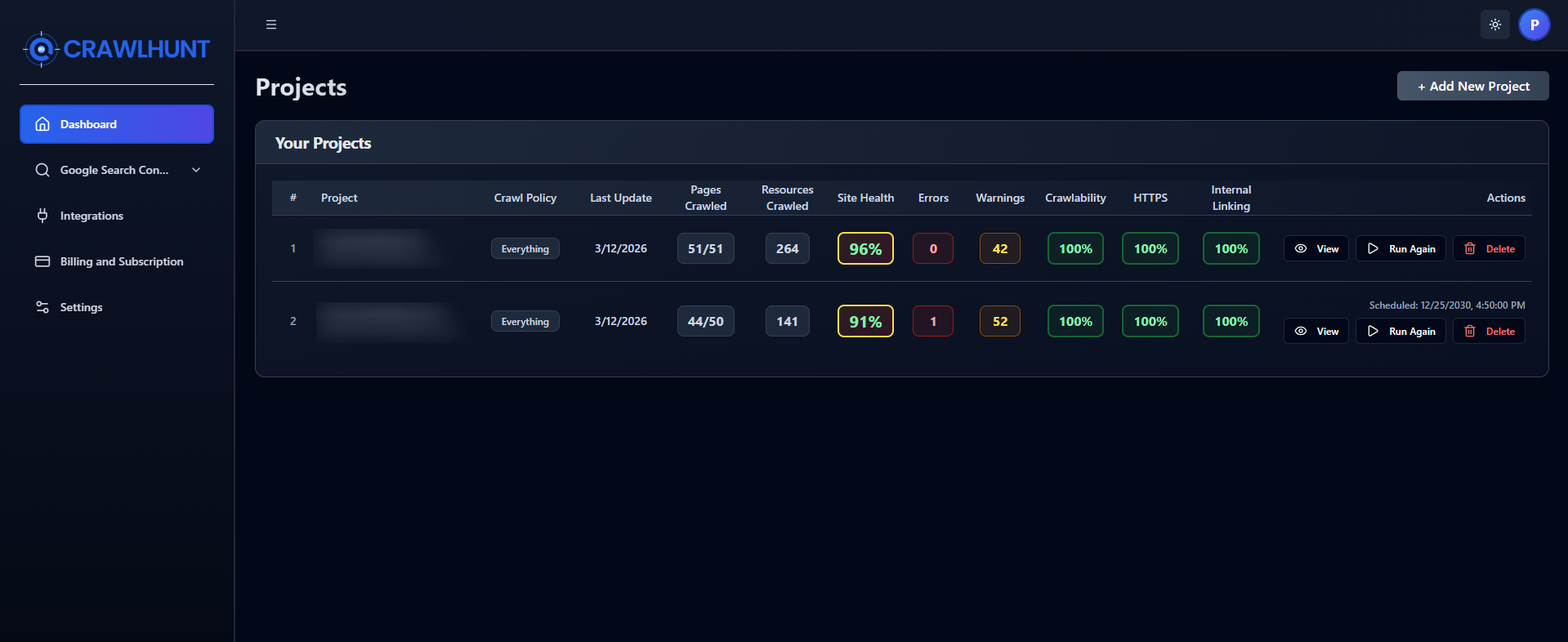
The first step is to sign up on Crawl Hunt and create an account. After signing up, log in to the account, and the dashboard will appear. The dashboard is where all SEO audit projects, integrations, and website scans are managed.
Once inside the dashboard, the first thing to do is click on Integration. Integration allows the tool to connect to the website and scan it for SEO issues such as missing meta tags, broken links, duplicate content, slow pages, and missing image alt text.
This step is important because the AI image alt text generator works only after the website is connected and scanned. Without integration, the tool cannot access website images or detect SEO issues.
After connecting to the website, the tool can crawl pages, analyze images, and detect which images are missing alt attributes.
Step 2: Add Integration and Connect Platform
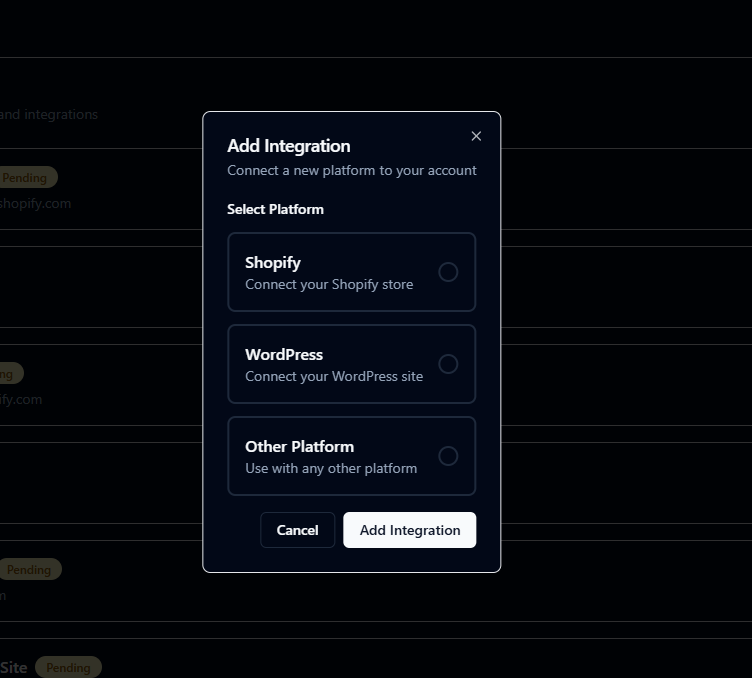
After opening the dashboard, click on the Integration option. Then the system will ask to select a platform to connect to the website.
You will see platform options such as:
- Shopify – Connect your Shopify store
- WordPress – Connect your WordPress site
- Other Platform – Use with any other platform
Select the platform based on your website. After selecting the platform, enter the website URL. Once the URL is added, the admin login page will open for that platform.
Log in to the website admin panel, and after logging in, the system will automatically redirect back to the Crawl Hunt website. This means the integration process is completed successfully.
This integration allows the AI image alt text generator to access the website images, scan pages, detect missing alt attributes, and provide AI-generated alt text suggestions.
Without integration, the tool cannot perform a website SEO audit or detect missing alt text images.
Step 3: Select the Suitable Plan
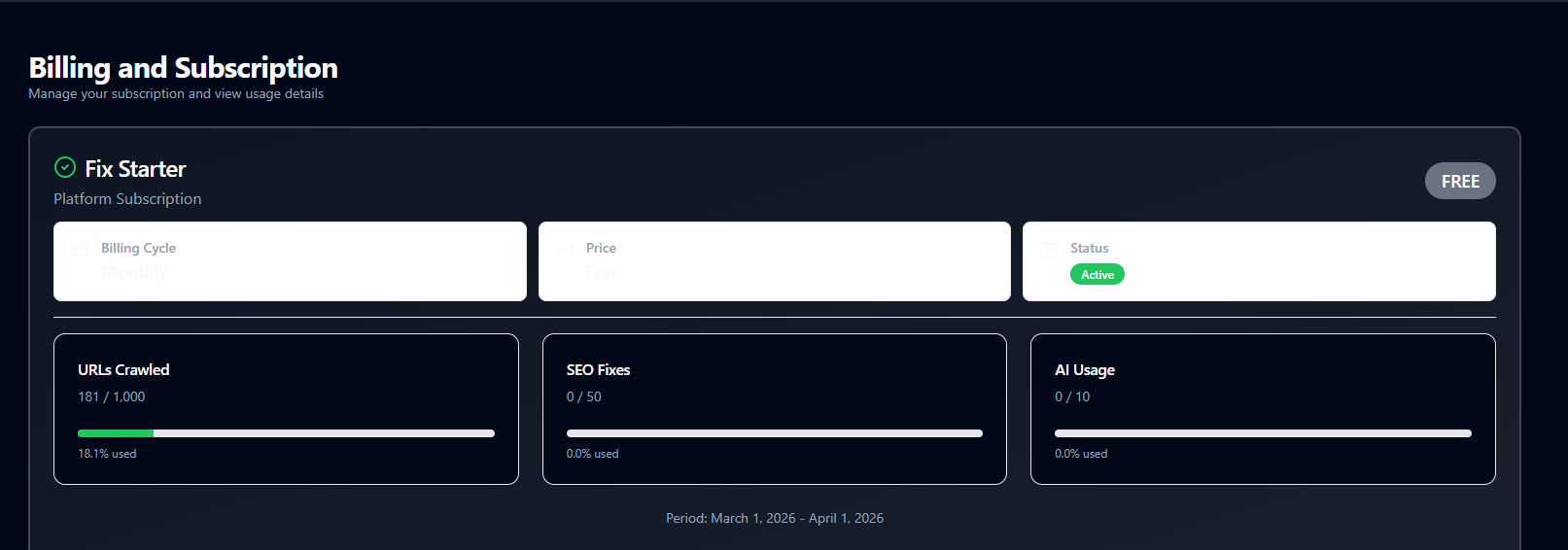
After connecting your website, the next step is to select a suitable plan based on your website size and SEO needs. If the website is small, new, or in the early stage, the Fix Starter free plan is a good option because it allows crawling up to 1,000 URLs, limited SEO fixes, and some AI-powered fixes, including the AI image alt text generator feature. This plan is useful for testing the platform and fixing basic SEO issues like missing alt text, meta tags, and redirects.
However, if the website is growing, has many pages, products, or images, then upgrading to a paid plan like Fix Pro, Fix Growth, or Fix Scale is recommended. Paid plans allow more crawling, more SEO fixes, and more AI fixes per month, which is helpful for large websites that regularly add new content and images. Choosing the right plan ensures the crawler scans all pages, and the ai image alt text generator can generate alt text for all missing images without limitations.
Step 4: Add New Project and Website Crawl Settings
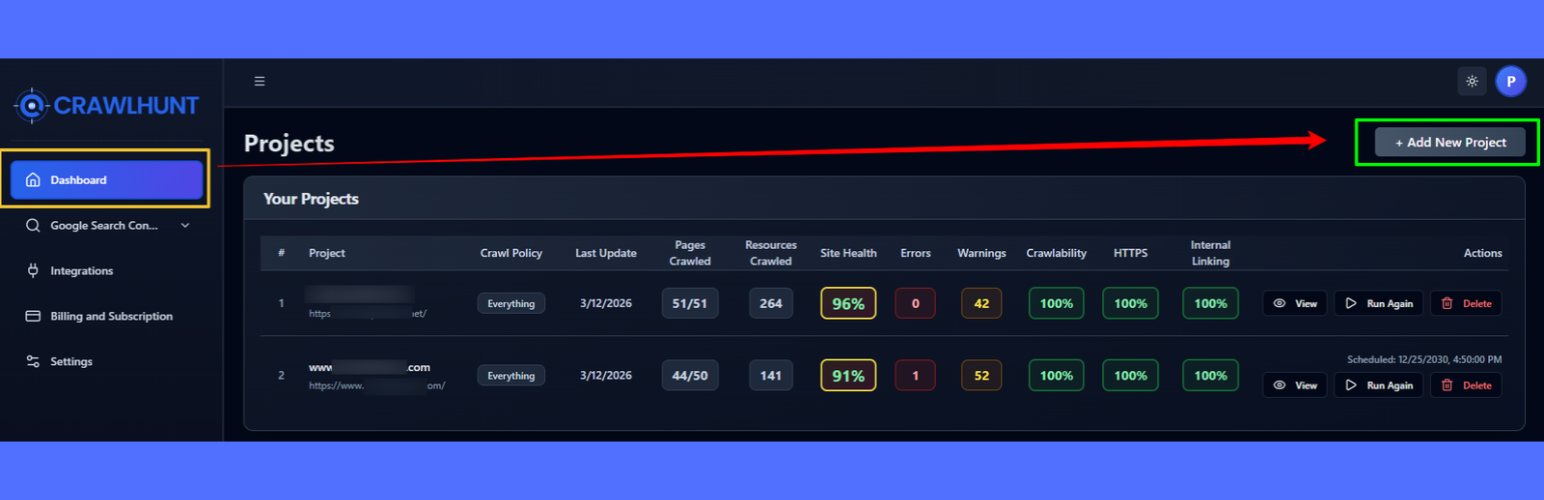
After completing the integration, go back to the dashboard. On the right-hand side corner (usually the top or bottom corner), there will be an option called Add New Project.
Click on Add New Project, and a project setup screen will open. Here, you need to enter the website details and crawling settings.
You will see the following options:
Add New Project
- Website URL (example.com)
- Crawl All Pages
- Crawl Limit (for example 50 pages)
- Crawl Policy
Crawl policy options include:
- Crawl everything
- Follow robots.txt (crawl only allowed pages)
- Follow sitemap.xml (crawl only sitemap pages)
Then there will be scheduling options:
- Run now
- Run at a specific time
After selecting all settings, click Create Project. The crawling process will start, and the tool will begin scanning the website pages, images, links, and SEO elements.
This crawling process is very important because the alt text generator works only after the website scan detects images that are missing alt text.
The crawl scan will analyze:
- Website pages
- Images
- Meta tags
- Links
- Page speed
- Technical SEO issues
- Missing alt attributes
Once the scan is completed, the audit report will be generated.
Step 5: View Complete SEO Audit Report
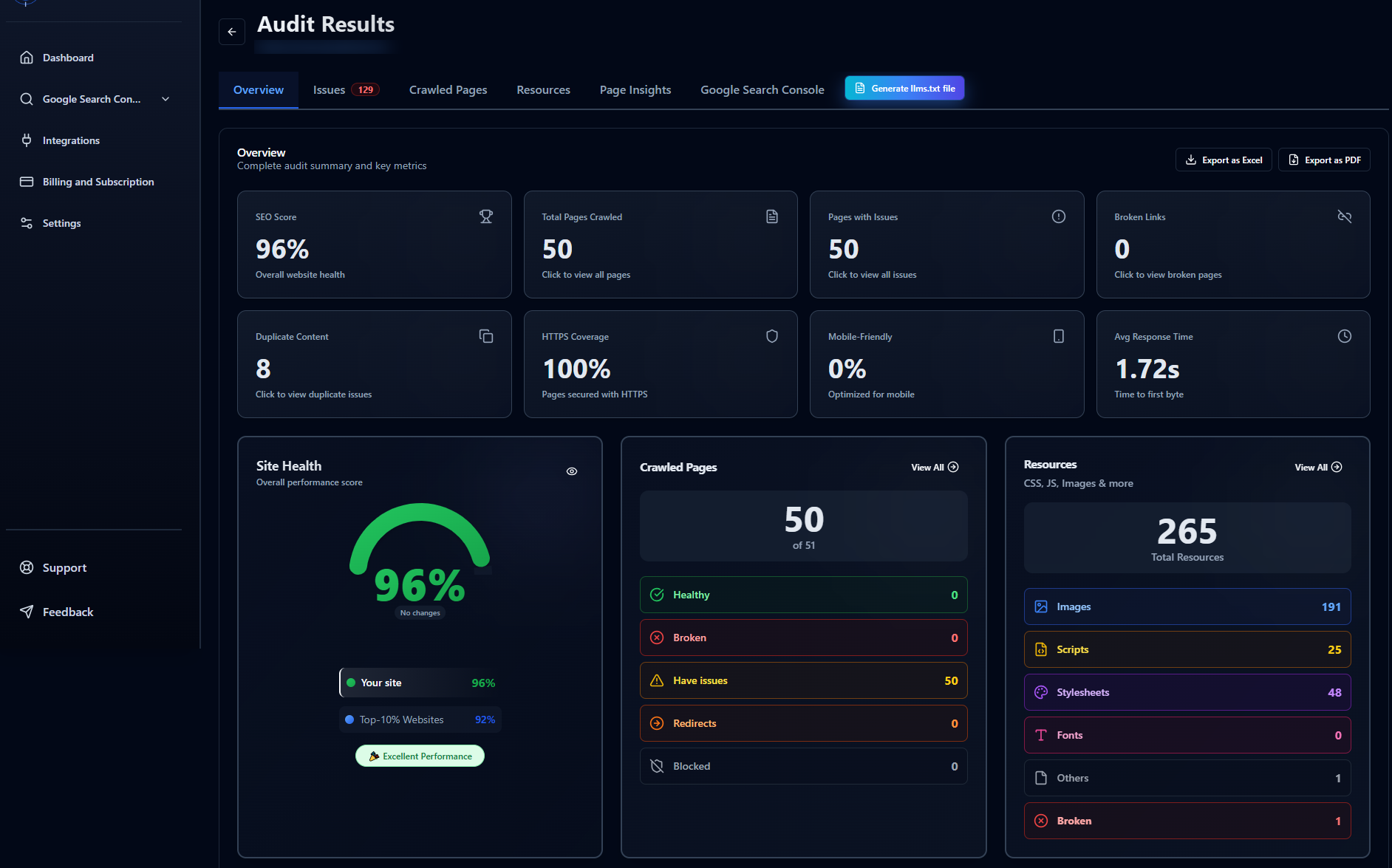
After the scanning process is completed, the tool will generate a complete SEO audit report of the website. This report contains all SEO issues found on the website.
There will be multiple audit categories, such as:
- Meta tags issues
- Broken links
- Duplicate content
- Page speed issues
- Mobile usability
- Technical SEO issues
- Image optimization issues
- Missing alt text images
There will be a View option to open the complete audit report. If needed, the scan can also be run again to update the audit results.
Inside the audit dashboard, many SEO improvements will be suggested, but here the focus is on the AI image alt text generator and fixing missing alt text images.
This step is important because many websites have hundreds of images without alt text, and manually finding them is very difficult without an SEO audit tool.
Step 6: Open Images – Missing Alt Text Section
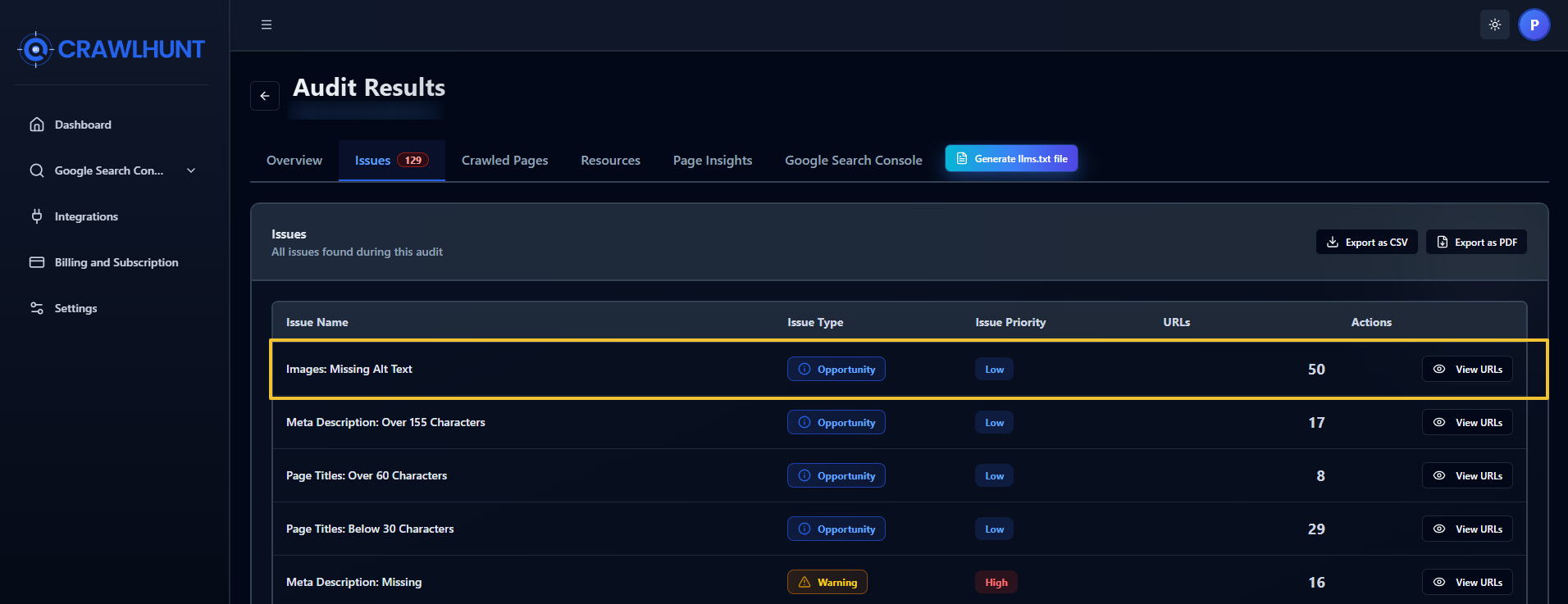
Inside the audit report, find the section called:
Images: Missing Alt Text
Click on this section. After clicking, the tool will show all the pages and URLs where images do not have alt text. Then click on View URL to see the images that are missing alt attributes.
This section shows:
- Page URL
- Image URL
- Alt text status
- Issue type (Missing Alt Text)
This is one of the most useful features because it directly shows which images need optimization. Instead of checking images manually, the tool automatically detects missing alt text images.
This is where the ai image alt text generator helps generate alt text automatically for each missing image.
Step 7: Generate Alt Text Using AI Fix Option
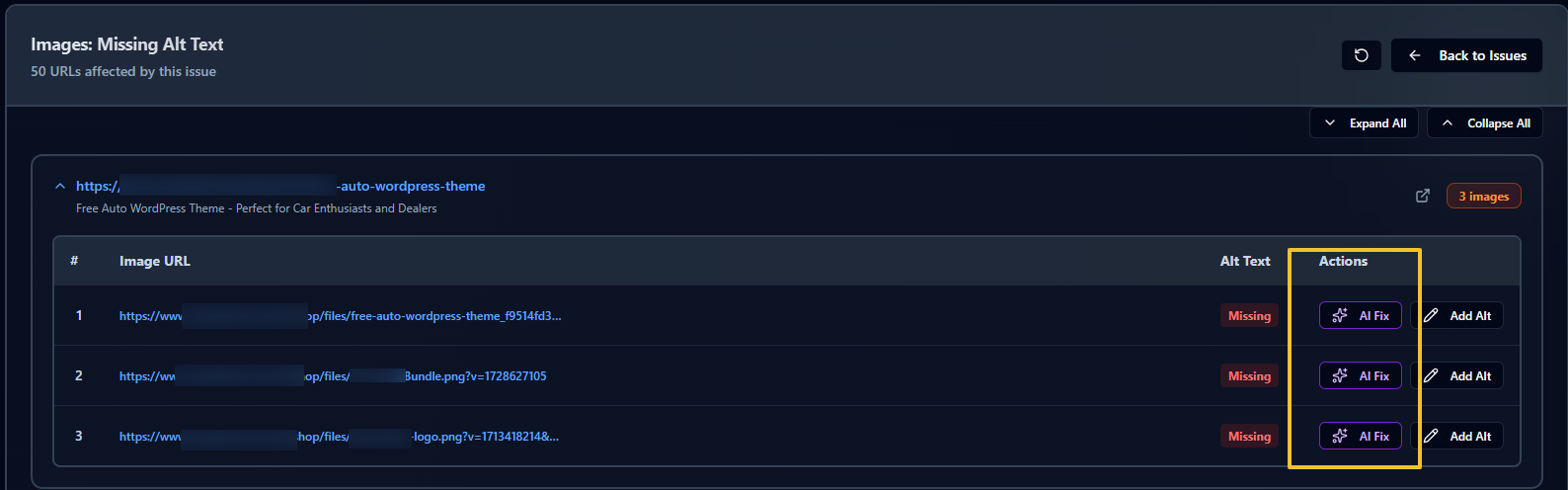
After opening the image issues list, there will be an option called Alt Text. Below that, the issue will be written as Missing Alt Text.
Next to that, there will be an option called AI Fix.
Click on AI Fix, and the AI will automatically generate alt text for the image based on the image content. The AI analyzes the image and creates a relevant description.
If the generated alt text is not suitable, there will be an option to Regenerate so a new alt text description can be created.
Once the generated alt text looks correct and relevant to the image, click Done, and the alt text will be updated directly on the website automatically.
This is how an ai image alt text generator helps generate optimized alt text quickly without manual effort. This feature is very helpful for websites with many product images, blog images, and banners.
Using the ai image alt text generator saves a lot of time and ensures that all images have SEO-friendly alt attributes.
Step 8: Add Alt Text Manually (Optional Method)
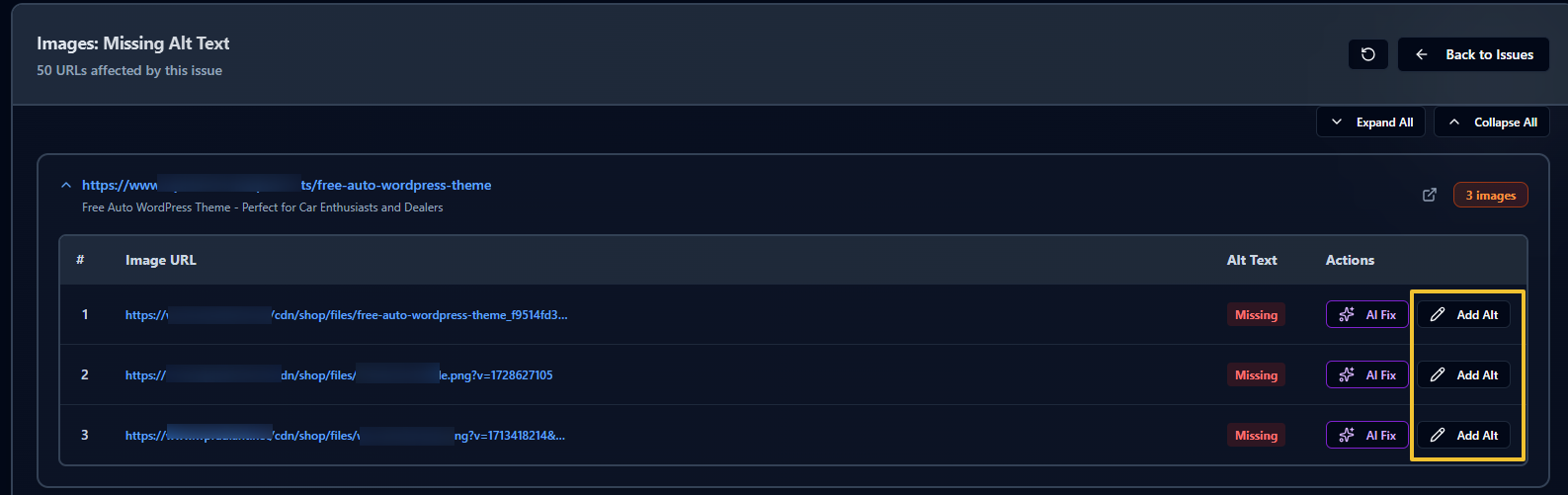
If AI-generated alt text is not preferred, there is also an option called Add Alt Text. This option allows writing alt text manually.
Manual alt text writing is useful when:
- Product images need specific descriptions
- Brand names must be included
- Technical product details are important
- AI-generated text is not accurate
While writing manual alt text, follow these best practices:
- Describe the image clearly
- Keep the description short and meaningful
- Use relevant SEO keywords naturally
- Do not stuff keywords
- Focus on describing the image, not ranking only
- Write alt text like describing the image to someone
Manual optimization combined with an ai image alt text generator gives the best results for image SEO and accessibility.
Step 9: Update and Fix All Missing Alt Text Images
After generating or manually writing alt text, update the changes. The tool will automatically fix the missing alt text issue on the website.
Once all missing alt attributes are fixed, the website will improve in many SEO areas, such as:
- Image SEO
- Accessibility SEO
- Technical SEO
- Website optimization score
- Search engine crawling
- Image search ranking
- Website quality score
Using an ai image alt text generator makes this process very fast and efficient, especially for websites with many images like eCommerce stores, blogs, portfolio websites, and business websites.
Regular SEO audits and image optimization help websites perform better in search engines and improve overall website SEO performance.
Conclusion
Alt text is a small part of a website, but it plays a big role in SEO, accessibility, and user experience. When images have clear and descriptive alt text, search engines can understand them better and show them in image search results. This helps improve website visibility and brings more organic traffic. Alt text also helps people who use screen readers understand what an image represents, making the website more accessible.
However, many websites still have images with missing alt text, which can affect both SEO and accessibility. This is where an AI image alt text generator becomes especially useful, as it can automatically create clear and relevant descriptions while saving valuable time. Tools like Crawl Hunt simplify the process by scanning websites and identifying images with missing alt attributes. As part of a best SEO audit tool workflow, fixing these gaps not only improves accessibility but also strengthens image SEO, helping websites achieve better rankings and overall performance.
Frequently Asked Questions (FAQs)
1. What is alt text, and why is it important for websites?
Alt text is a short description added to images that helps search engines and screen readers understand visual content. It improves both SEO performance and accessibility, making websites more user-friendly for everyone.
2. How does missing alt text affect SEO?
When images lack alt text, search engines cannot properly interpret them, which reduces their chances of appearing in image search results. This can lead to missed opportunities for organic traffic and weaker overall SEO signals.
3. Can alt text improve accessibility for users?
Yes, alt text plays a key role in accessibility by helping screen readers describe images to visually impaired users. Without it, important visual information may be completely lost to those users.
4. How can an AI Image Alt Text Generator help website owners?
It automates the process of creating descriptive alt text, saving time and effort, especially for websites with many images. It also ensures consistency and improves both SEO and accessibility at scale.
5. Is manual alt text writing still necessary?
Manual alt text is useful when images require specific context, branding, or detailed descriptions. Combining manual input with automated tools often delivers the best results for accuracy and optimization.