Search engine optimization is no longer just about keywords and backlinks. Today, technical SEO plays a major role in how websites rank on Google. One of the most important parts of technical SEO is understanding how to Fix Crawl Errors before they damage your rankings, traffic, and indexing. Crawl errors prevent search engines from properly accessing your web pages, which can reduce visibility and hurt user experience.
When Google bots cannot crawl your pages correctly, important content may never appear in search results. Broken links, redirect chains, server issues, missing metadata, and duplicate pages are some common reasons websites struggle with indexing. That is why businesses, bloggers, ecommerce stores, and agencies continuously look for effective ways to improve website crawlability and site health.
In this detailed guide, you will learn How to Fix Crawl Errors quickly using modern SEO practices. We will cover technical SEO strategies, crawl diagnostics, indexing solutions, website optimization methods, and AI automation features that can help improve search rankings fast.
Why Crawl Errors Hurt SEO Performance?
Search engines prioritize websites that are fast, accessible, and technically optimized. Crawl issues create obstacles for search engine crawlers and reduce website trust signals.
Here is how crawl problems hurt SEO:
- Reduced Indexing: If Google cannot crawl a page, it may not index it.
- Lower Rankings: Technical issues signal poor site maintenance, which can affect ranking performance.
- Wasted Crawl Budget: Search engines allocate limited crawl resources to each website. Broken pages waste crawl budget.
- Poor User Experience: Broken links and redirect issues frustrate users and increase bounce rates.
- Slower SEO Growth: Even strong content marketing strategies fail if technical SEO problems remain unresolved.
Learning How to Fix Crawl Errors helps improve all these areas simultaneously.
Step-by-Step Process to Detect and Fix Crawl Errors Using Crawlhunt
If you want to learn How to Fix Crawl Errors effectively, the first step is running a complete technical SEO audit with Crawlhun. Crawlhun helps website owners identify crawl issues, broken links, redirect problems, indexing errors, and other technical SEO weaknesses that can hurt search engine rankings. By setting up a crawl project properly, you can analyze your website structure in depth and discover the exact issues preventing Google from crawling and indexing your pages efficiently.
Step 1: Add a New Project in Crawlhunt

The first step in understanding How to Fix Crawl Errors is setting up a complete website audit project inside Crawlhunt. This process helps the platform analyze your entire website structure, identify Crawlability and Indexability issues, and generate detailed SEO reports. When you add a new project, Crawlhunt starts preparing a technical SEO environment where your website pages, links, metadata, redirects, and indexing signals can be scanned thoroughly. This is important because search engines like Google constantly evaluate website health, and any unnoticed crawl issue can negatively impact rankings and organic traffic.
Inside the dashboard, you need to enter your website URL correctly. After that, choose the number of pages you want to crawl and configure the crawl policy. You can select options like following all links, respecting robots.txt instructions, or crawling sitemap pages only. These settings determine how deeply the audit scans your website structure. If you run a large ecommerce store or enterprise website, proper crawl configuration becomes extremely important because thousands of pages may exist across categories, products, and blog sections.
Once you configure the project settings, you can choose whether to run the crawl immediately or schedule it for later. After clicking “Create Project,” Crawlhunt begins scanning your site architecture, URLs, internal links, response codes, metadata, images, and technical SEO elements. This step forms the foundation for identifying website problems quickly and understanding How to Fix Crawl Errors using a structured technical SEO workflow.
Pricing: Users can choose from three CrawlHunt pricing plans based on their requirements. The Basic plan is free forever, the Growth plan costs $59 each month, and the Scale plan is available for $149 per month for enterprise-level SEO management.
Step 2: Configure Website Crawl Settings Properly
Configuring the crawl settings correctly is one of the most important technical SEO processes because it controls how the website audit behaves. In Crawlhunt, users can customize the crawl environment based on their website size, SEO goals, and indexing priorities. Proper crawl configuration helps avoid unnecessary scans while ensuring all important pages are analyzed effectively.
You first need to enter your website URL accurately. This tells the crawler which domain should be scanned. After that, you can select “All Pages” if you want the tool to analyze the complete website structure. Many website owners use this option because it helps uncover hidden SEO problems, broken links, duplicate pages, and indexing issues across the entire domain.
The crawl limit setting is also important because it determines how many pages the crawler will scan during the audit. For smaller websites, lower limits may work perfectly, while larger ecommerce or publishing websites often require broader crawling coverage. You can also configure the crawl schedule. A one-time crawl is useful for immediate audits, while scheduled crawls help businesses monitor SEO performance continuously.
The crawl policy section allows you to define how the crawler should behave. Choosing “Follow all links” enables full website exploration, while respecting robots.txt rules ensures compliance with search engine crawling instructions. Sitemap-only crawling focuses the audit specifically on URLs included inside your XML sitemap. These settings improve crawl efficiency and help website owners diagnose SEO issues more accurately while learning How to Fix Crawl Errors in a professional manner.
Step 3: Run the Website Crawl Audit
After configuring the crawl settings, the next step is launching the website audit. Running the crawl allows Crawlhunt to analyze your website’s technical SEO health in real time. During this process, the crawler behaves similarly to a search engine bot by visiting pages, checking response codes, analyzing metadata, and evaluating internal linking structures.
This step is essential because many technical SEO issues remain invisible unless a full crawl audit is performed. Search engines encounter these problems daily while trying to access and index website pages. If errors remain unresolved, rankings and visibility may gradually decline. Running the audit gives website owners a complete picture of their SEO health and helps them prioritize fixes based on severity.
The crawling process examines various technical factors, including:
- Broken internal links
- Redirect chains
- Missing title tags
- Duplicate metadata
- Slow-loading pages
- Indexability problems
- Canonical tag issues
- Missing H1 headings
- Server response errors
Once the crawl finishes, Crawlhunt generates a comprehensive SEO report. This report acts like a technical roadmap that explains where website problems exist and how they affect crawlability. Businesses, bloggers, agencies, and ecommerce stores can use these insights to improve site performance and better understand How to Fix Crawl Errors quickly before rankings are affected further.
Step 4: Analyze the Overview Dashboard
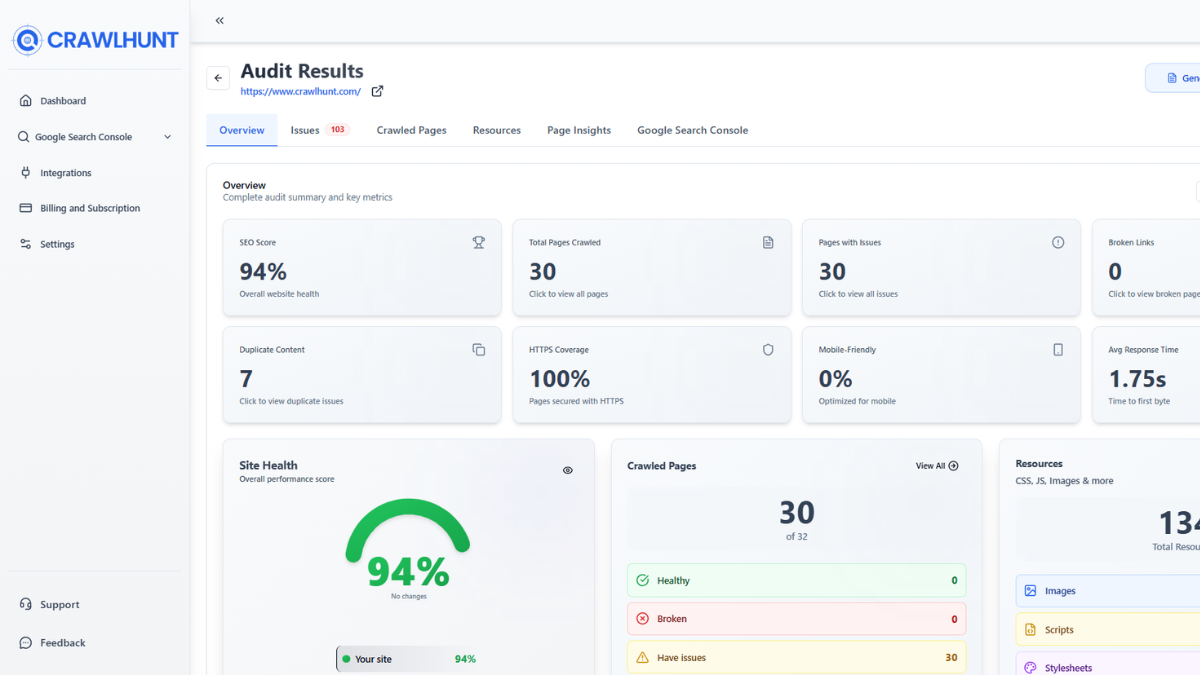
After the crawl completes, the Overview dashboard becomes the central area for understanding your website’s technical SEO condition. In Crawlhunt, this dashboard provides a summarized analysis of crawl results, helping users quickly identify critical SEO problems that require attention.
The Overview section usually displays:
- Total crawled pages
- Technical errors
- Warnings
- Redirect issues
- SEO scores
- Page performance metrics
- Crawl health indicators
This dashboard simplifies technical SEO analysis because users no longer need to manually inspect every webpage individually. Instead, they receive a visual representation of website health and can immediately identify areas that need improvement. For example, if the dashboard shows multiple redirect errors or a large number of pages with missing metadata, those problems can be prioritized first.
The Overview section also helps monitor overall crawl efficiency. If search engine bots encounter too many errors while crawling your website, important pages may never get indexed properly. Reviewing these metrics regularly allows businesses to maintain healthy crawlability and improve organic search performance over time.
This stage is highly valuable for anyone learning How to Fix Crawl Errors because it transforms complex technical SEO data into understandable reports that support faster decision-making and website optimization.
Step 5: Open the Crawled Pages Report
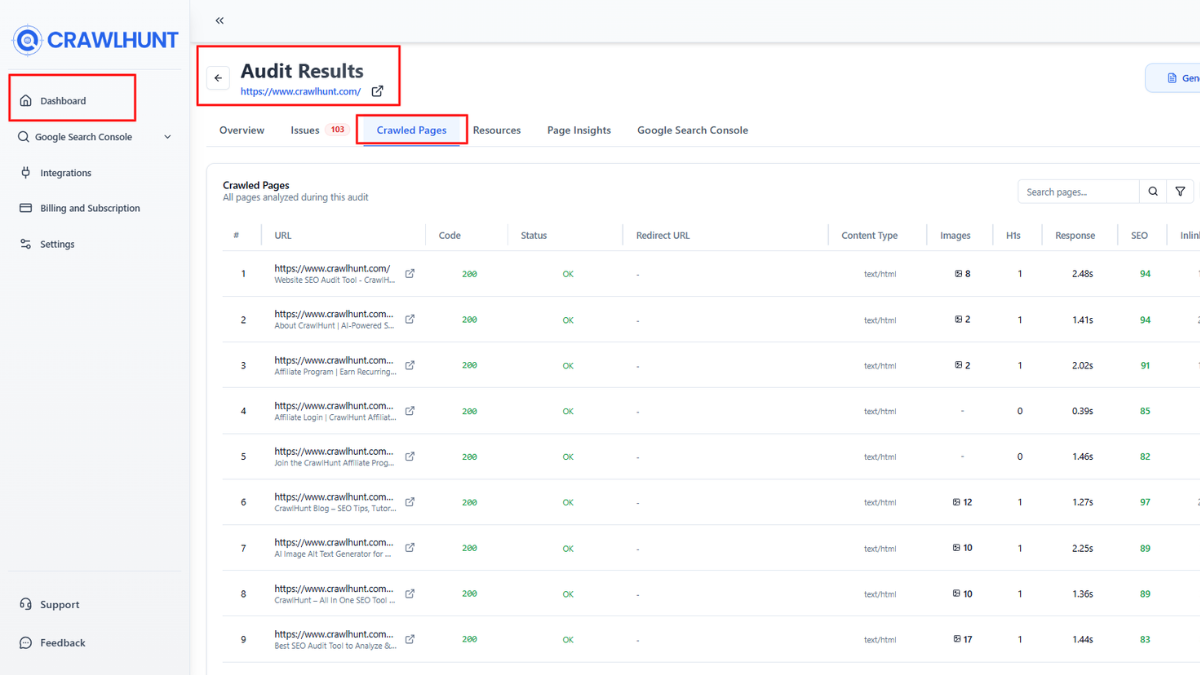
The Crawled Pages section is one of the most powerful features inside Crawlhunt because it provides a page-by-page breakdown of your website audit. This area displays every scanned URL along with technical SEO data that helps identify exactly where crawl problems exist.
When you open the Crawled Pages report, you will see columns such as:
- URL
- Status code
- Redirect URL
- Content type
- Images
- H1 count
- SEO score
- Response time
- Inlinks
- Outlinks
- Issues
This detailed report allows website owners to investigate individual SEO problems more efficiently. For example, pages returning 404 errors can be located instantly, while slow-loading URLs can be identified for performance optimization. Missing H1 headings, duplicate content signals, and poor internal linking structures also become visible here. A strong Internal Linking Strategy further helps website owners improve site navigation, distribute page authority effectively, and ensure important pages are easily discoverable by both users and search engines.
The ability to export reports as CSV or PDF is especially useful for SEO agencies and technical teams because they can share findings with developers, clients, or content managers. Instead of manually checking hundreds of pages, Crawlhunt organizes all technical SEO data into a structured format that saves significant time and effort.
This step is extremely important in mastering How to Fix Crawl Errors because it helps isolate technical issues at the URL level, making problem-solving more accurate and manageable.
Step 6: Review Individual Page Details
Clicking on a specific URL inside the Crawled Pages report opens a deeper technical analysis called the Page Details section. This feature in Crawlhunt gives website owners advanced SEO insights about a single page, allowing them to diagnose problems more precisely.
The Page Details panel includes:
- Status codes
- Canonical tags
- Redirect information
- Schema markup
- SEO score
- Response time
- Indexability data
- Inlinks and outlinks
- Warnings and errors
For example, a page may show a 301 redirect status, missing H1 tags, low SEO score, or no indexability signals. These indicators help explain why certain pages are underperforming in search results. If a page has slow response times or missing metadata, search engines may struggle to understand and rank the content effectively.
This detailed analysis is extremely useful because it removes guesswork from technical SEO optimization. Instead of making random changes, website owners can focus specifically on the issues affecting each URL. Understanding individual page weaknesses is a major part of learning How to Fix Crawl Errors strategically and improving overall website health.
Step 7: Use AI SEO Fixes for Optimization

One of the most advanced features in Crawlhunt is its AI-powered SEO fixing system. After identifying technical SEO issues, users can either fix problems manually or allow AI tools to generate optimized solutions automatically.
Inside the SEO section, users can enter a target keyword and apply AI fixes for:
- Meta titles
- Meta descriptions
- URL handles
- SEO optimization
This feature is highly beneficial because many websites suffer from missing metadata, weak titles, or poorly optimized descriptions. Search engines rely heavily on metadata to understand page content, and missing SEO elements often reduce visibility in search results.
The AI system helps create optimized metadata aligned with SEO best practices, keyword relevance, and search intent. This saves time for businesses and improves consistency across large websites. Instead of manually editing hundreds of pages, users can automate SEO enhancements efficiently.
For beginners especially, AI-powered optimization simplifies the process of learning How to Fix Crawl Errors because it combines technical SEO diagnostics with automated content improvements inside a single platform.
Step 8: Configure Redirects Properly
Redirect management is one of the most critical technical SEO tasks because incorrect redirects can damage crawl efficiency and user experience. In Crawlhunt, users can configure redirects directly from the dashboard to preserve SEO value and improve navigation.
When pages are deleted, renamed, or moved, redirects help send users and search engines to the correct destination. Without proper redirects, visitors encounter 404 errors, and search engines lose access to important content. This can reduce rankings and waste crawl budget.
Inside the Redirect Configuration section, users can:
- Add redirect URLs
- Fix redirect chains
- Remove redirect loops
- Improve page transitions
- Maintain SEO authority
The AI Fix option also helps automate redirect recommendations, making the process faster and easier for non-technical users. Proper redirect management protects backlinks, preserves indexing signals, and strengthens overall technical SEO performance.
Understanding redirects is essential when learning How to Fix Crawl Errors because poor redirect handling is one of the most common causes of crawl inefficiency and ranking loss.
Step 9: Connect Your Website for Live SEO Updates
The final step involves connecting your website directly with Crawlhunt, so all SEO improvements can be reflected automatically on the live site. This integration eliminates the need for manual code editing and simplifies technical SEO management significantly.
Once connected, the platform can apply:
- AI-generated metadata
- Redirect changes
- SEO fixes
- Technical optimizations
- Crawlability improvements
This feature is extremely valuable for businesses managing large websites because manual SEO implementation can become time-consuming and error-prone. By automating technical updates, website owners can improve SEO efficiency while reducing operational workload.
Direct integration also ensures faster implementation of crawl fixes, which helps search engines discover updated pages more quickly. This improves indexing speed, search visibility, and website performance over time.
For agencies and ecommerce businesses especially, connecting the website creates a streamlined SEO workflow that supports continuous optimization and long-term ranking improvements.
Conclusion
Understanding How to Fix Crawl Errors is essential for improving search engine rankings, website visibility, and technical SEO performance. Crawl errors prevent search engines from accessing important pages, which reduces indexing efficiency and weakens organic traffic growth. Problems such as broken links, redirect chains, server errors, missing metadata, and blocked resources can severely affect your website’s SEO health if ignored.
Modern SEO requires fast auditing, accurate diagnostics, and automation. That is why tools like Crawlhun are becoming valuable for businesses, ecommerce websites, bloggers, and agencies. Crawlhun helps detect technical SEO issues, analyze crawl reports, generate AI-powered SEO fixes, manage redirects, and improve website crawlability directly from a single dashboard.
By performing regular audits, optimizing site architecture, improving internal links, and fixing technical SEO issues quickly, you can strengthen your website authority and boost organic rankings faster. Consistent crawl optimization ultimately creates a healthier, faster, and more search-engine-friendly website that performs better in competitive search results.
Frequently Asked Questions (FAQs)
Can crawl errors affect Google rankings?
Yes, crawl errors can directly impact Google rankings because search engines may struggle to access and index your pages properly. When bots encounter too many technical issues, important content may not appear in search results. Websites with strong technical SEO and fewer crawl issues usually perform better in organic search rankings.
How often should I check for crawl errors?
Website owners should monitor crawl errors regularly to maintain healthy SEO performance. Small websites can perform monthly audits, while ecommerce stores, news websites, and large business websites should run weekly or even daily crawl reports. Frequent audits help identify technical SEO issues before they damage rankings and traffic.
What is the difference between crawl errors and indexing errors?
Crawl errors happen when search engine bots cannot access a webpage, while indexing errors occur when pages are crawled but not added to search engine indexes. Crawlability issues usually happen first and may eventually lead to indexing problems if not resolved quickly.
Does website speed affect crawlability?
Yes, page speed is an important ranking and crawlability factor. Slow-loading websites consume more crawl budget and make it harder for search engines to access pages efficiently. Optimizing images, improving hosting performance, enabling caching, and reducing unnecessary scripts can improve crawl speed and overall SEO performance.
Can redirects cause crawl errors?
Improper redirects are one of the most common technical SEO problems. Redirect chains, redirect loops, and broken redirects confuse search engine crawlers and waste crawl budget. Proper redirect management helps preserve SEO value, improve user experience, and maintain healthy crawlability across your website.