Internal linking plays an important role in website SEO by helping search engines discover pages and enabling visitors to navigate related content. However, creating the right internal linking strategy requires more than simply connecting pages across a website. As a website grows, identifying relevant linking opportunities and maintaining connections between blog posts, product pages, and other content can become time-consuming.
An AI Internal Linking Tool can simplify this process by identifying opportunities and automating link creation. CrawlHunt helps website owners streamline internal linking with AI, making it easier to connect relevant pages, improve website navigation, and maintain a well-organized site structure while reducing the manual effort involved in managing internal links.
Why Is Internal Linking Important In SEO?
Internal linking is an essential SEO practice that connects different pages within the same website. It allows search engines understand your website structure while allowing visitors to discover relevant information. Here are seven reasons why internal linking matters for SEO.
- Improves Website Crawling: Internal links create pathways between pages, allowing search engine bots to navigate your website and locate relevant content. Strong internal linking supports crawlability and indexability, since bots can reach and process more of your pages. An organized internal linking structure improves page discoverability and helps search engines interpret how your website's content is connected.
- Allows Search Engines Understand Content: Internal links connect related pages, helping search engines understand the relationship between your content and how different topics are connected across your website.
- Distributes Link Authority: Internal links can pass link equity between pages, helping distribute ranking signals throughout your website and support important pages. While external links point visitors elsewhere, internal links keep authority circulating within your site, and balancing internal and external links gives your key pages the support they need.
- Improves User Navigation: Relevant links help visitors find additional information without repeatedly returning to the main menu or searching manually.
- Strengthens Topical Authority: Connecting related articles and resources helps establish clear topic relationships across your website.
- Increases Content Discoverability: Internal links direct visitors to useful blog posts, product pages, and resources they might otherwise miss.
- Supports Better SEO Performance: A logical internal linking structure allows search engines discover and interpret content while creating a more useful browsing experience for visitors.
A well-planned internal linking strategy allows search engines understand your website while guiding visitors to relevant content. With the right approach, you can strengthen your site structure and make your content more discoverable.
What Is CrawlHunt's AI Internal Linking Tool?
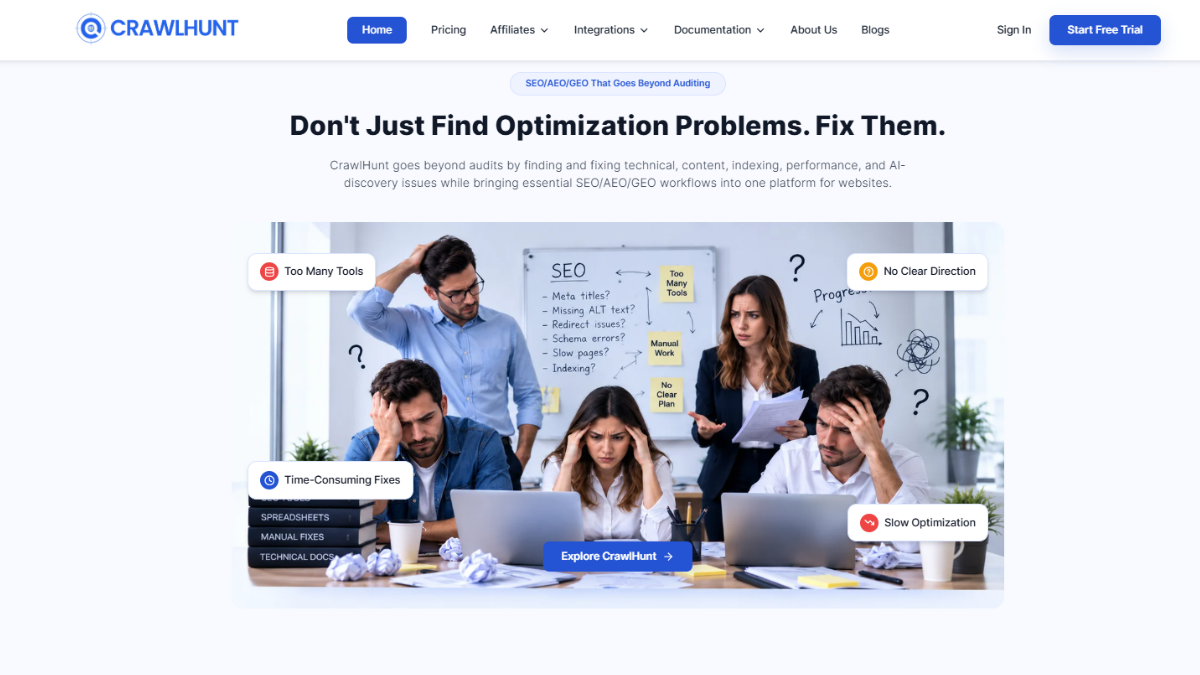
CrawlHunt's AI Internal Linking Tool helps website owners identify relevant opportunities to connect pages across their websites. Instead of manually reviewing every blog post, product page, and collection, you can use AI to find places where linking to another page would genuinely help readers.
The tool also identifies broken links and redirecting links within existing content, helping you spot issues that may affect navigation and fix 404 errors before visitors run into them. Additionally, it highlights pages that have no inbound internal links, making it easier to identify orphan pages that visitors and search engines may struggle to discover through your website's link structure.
CrawlHunt brings these internal linking opportunities into one place, allowing you to review recommendations and apply relevant links without manually searching through every piece of content. This makes internal linking easier to manage as your website grows.
What Makes CrawlHunt the Best AI Internal Linking Tool?
Choosing an AI Internal Linking Tool involves more than finding software that automatically inserts links. The recommendations should be relevant, the anchor text should fit naturally, and website owners should retain control over content changes. CrawlHunt addresses these considerations through its AI-powered internal linking workflow.
1. Finds Relevant Internal Linking Opportunities
Not every page on your website needs a link to every other page. Internal links should connect content that shares a meaningful relationship and provides additional value to readers.
CrawlHunt uses AI to identify places in existing content where linking to a relevant blog post, product page, collection, or other page could help readers explore a topic further. This helps you discover linking opportunities that might otherwise be missed during manual reviews.
By identifying relevant connections between pages, CrawlHunt helps you build a more organized internal linking structure while making useful content easier to discover.
2. Uses Appropriate Anchor Text
Anchor text is the clickable text that users select to open another page. It helps readers understand what to expect from the linked destination and provides search engines with contextual information about the target page.
CrawlHunt evaluates internal linking opportunities with anchor text in mind, helping you identify suitable phrases within your content. When the existing wording does not provide a natural fit, its light rewording option allows AI to adjust a sentence while preserving its original meaning.
This makes it easier to create descriptive, contextual anchor text instead of relying on generic phrases that provide little information about the destination.
3. Considers Link Placement and Control
Where you place an internal link matters because it should support the surrounding content rather than interrupt the reading experience. A relevant link placed within a useful explanation can help readers find additional information at the right moment.
CrawlHunt identifies potential linking locations within existing content and provides recommendations that you can review before applying. You can examine the suggested anchor text, target page, and relevance to decide whether each link belongs in that context.
This review process gives website owners more control over their internal linking decisions instead of requiring them to accept every AI-generated recommendation without evaluation.
4. Avoids Generic AI-Generated Linking
Automatically adding links without considering context can result in awkward sentences, irrelevant destinations, or anchor text that does not accurately describe the linked page.
CrawlHunt uses AI to identify opportunities where linking to another page would genuinely help the reader. Its recommendations consider the relationship between the existing content and the proposed destination, rather than simply adding links wherever possible.
The optional light rewording setting also helps address situations where an appropriate linking opportunity exists but the original sentence lacks a suitable phrase for the anchor text. This helps maintain a natural reading experience while improving connections between related pages.
5. Automates Internal Linking at Scale
Manually reviewing hundreds or thousands of website pages to find relevant internal linking opportunities can require considerable time and effort. The challenge becomes greater as new blog posts, products, and collections are added.
CrawlHunt automates the discovery process by scanning your content and presenting potential internal links in a centralized interface. You can review individual recommendations or apply multiple recommendations in bulk, reducing the need to edit every page separately.
The tool also supports scheduled rescans using AI credits, helping you identify new opportunities as your website changes. Only changed items are charged for these scheduled rescans, according to the described feature.
6. Simplifies Internal Linking Management
Managing internal links involves more than adding new connections. Website owners also need to identify broken links, find links that lead through redirects, and discover pages without inbound internal links.
Instead of switching between separate SEO analysis tools, CrawlHunt brings these issues and linking opportunities into one workflow. Its interface displays the available recommendations and relevant information, including anchor text, target pages, relevance, inbound links, and link type.
With options to apply recommendations individually or in bulk, you can manage internal linking more efficiently without repeatedly searching through your website's content.
How to Automate Internal Linking Using CrawlHunt
Automating internal linking with CrawlHunt helps you identify relevant linking opportunities across your website without manually reviewing every blog post, product page, or collection. Its Blog Internal Linking feature uses AI to analyze your content, suggest relevant connections, and help you apply internal links directly to your website. You can also review existing link issues and identify pages that need more internal connections.
Follow these steps to automate your website's internal linking using CrawlHunt.
Step 1. Open the Blog Internal Linking Feature
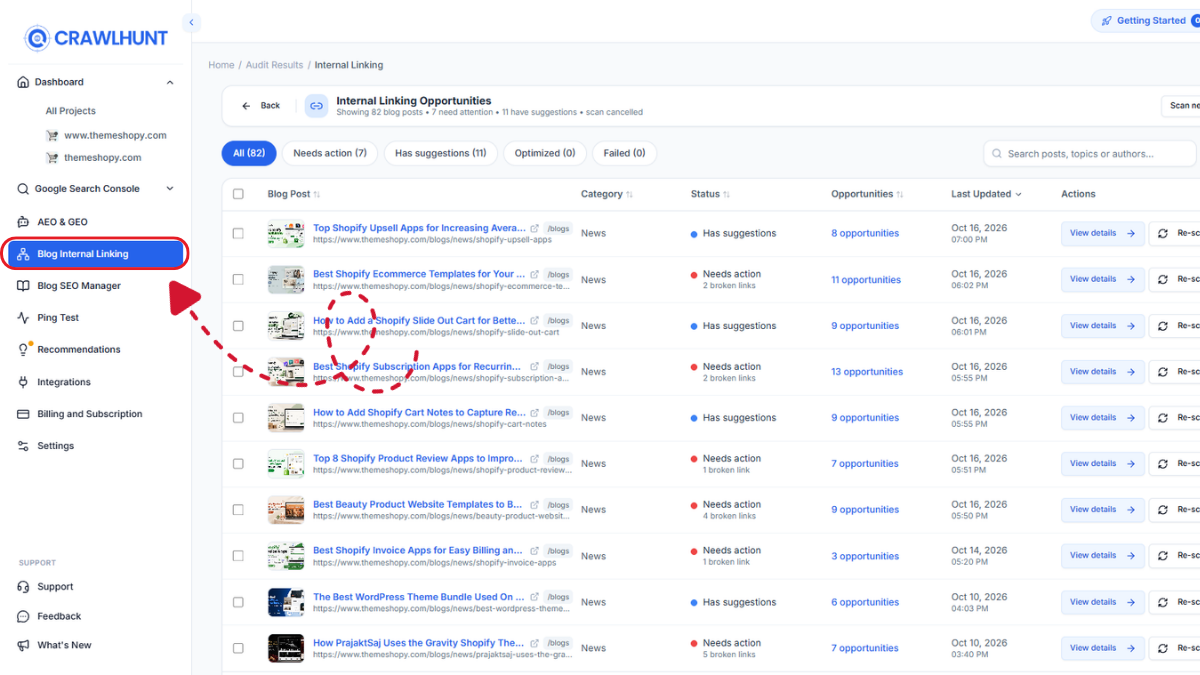
Log in to your CrawlHunt application and navigate to the Blog Internal Linking feature. This section helps you discover internal linking opportunities across your website content and manage the recommendations generated by AI.
Before starting the scan, review the available settings to decide how CrawlHunt should handle existing text when inserting internal links. Configuring these preferences first helps you align the automation process with your content management requirements.
Step 2. Configure the Allow Light Rewording Setting
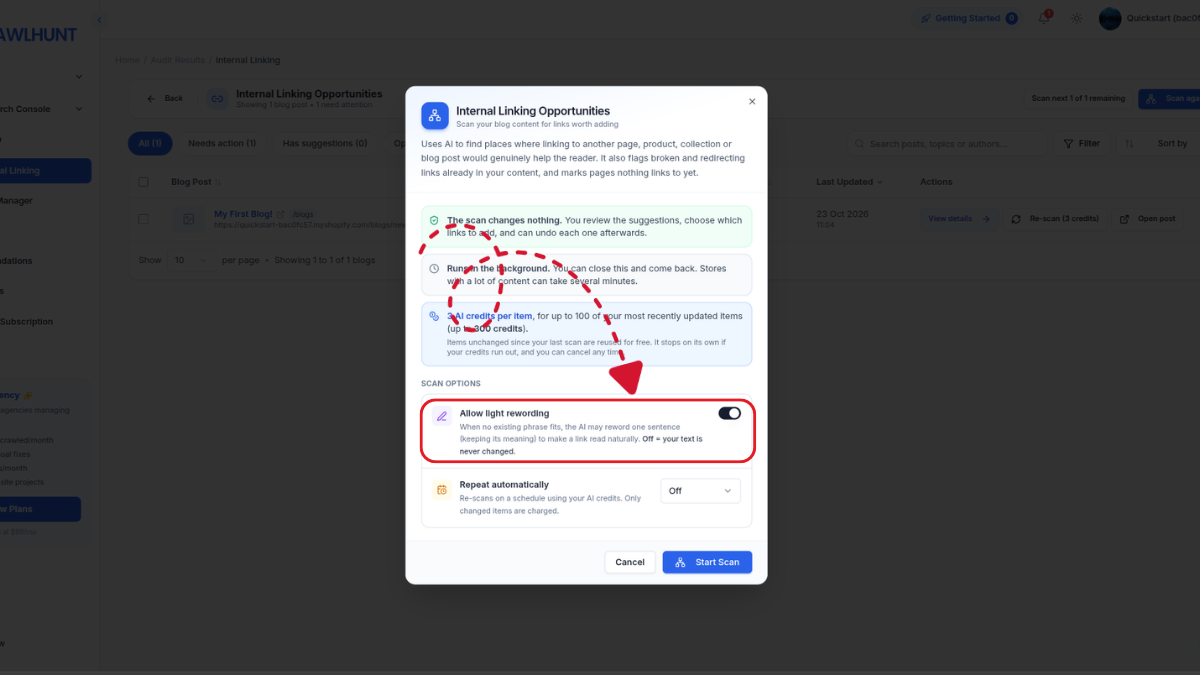
CrawlHunt includes an Allow light rewording setting that determines whether AI can make minor changes to your existing content to accommodate internal links naturally.
When this option is enabled, AI can reword a sentence while preserving its original meaning if no existing phrase provides a suitable anchor text. This helps improve the contextual relevance of a link and makes it easier to incorporate descriptive anchor text without disrupting the reading experience.
For example, suppose your blog contains a sentence about improving website performance, but the wording does not naturally fit a link to your website optimization guide. With light rewording enabled, AI can make a small adjustment to the sentence to accommodate the link more naturally.
If you disable this setting, your existing text will not be changed to accommodate internal links. This is useful when you want to preserve the original wording of published content.
Choose the setting according to your requirements before proceeding with the scan.
Step 3. Configure Scheduled Rescans
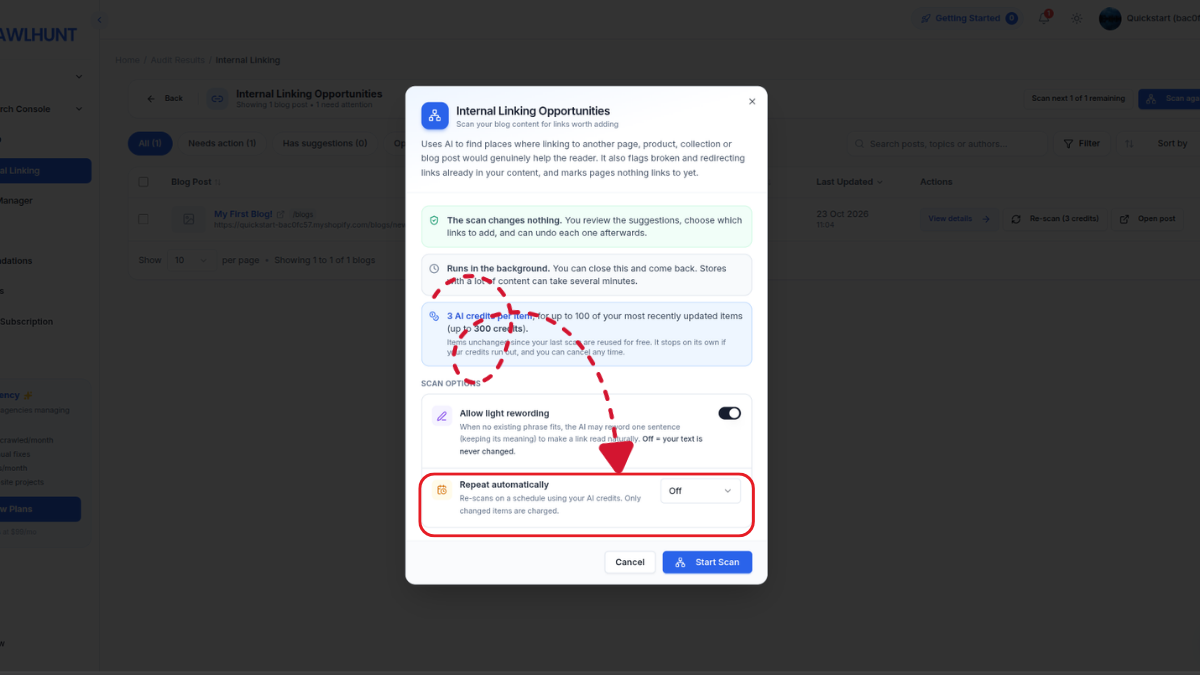
If your website regularly publishes new articles or adds products and collections, reviewing internal linking opportunities manually after every update can become time-consuming.
CrawlHunt allows you to schedule rescans using AI credits. Scheduled rescans help you identify new opportunities as your website content changes, reducing the need to initiate scans manually each time.
Another useful aspect is that only changed items are charged during scheduled rescans, according to the feature's described functionality. This helps avoid repeatedly charging for unchanged items when the tool checks your website again.
Configure a suitable rescan schedule based on how frequently you publish new content and how many AI credits you want to allocate to internal linking.
Step 4. Click Scan Now to Find Internal Linking Opportunities
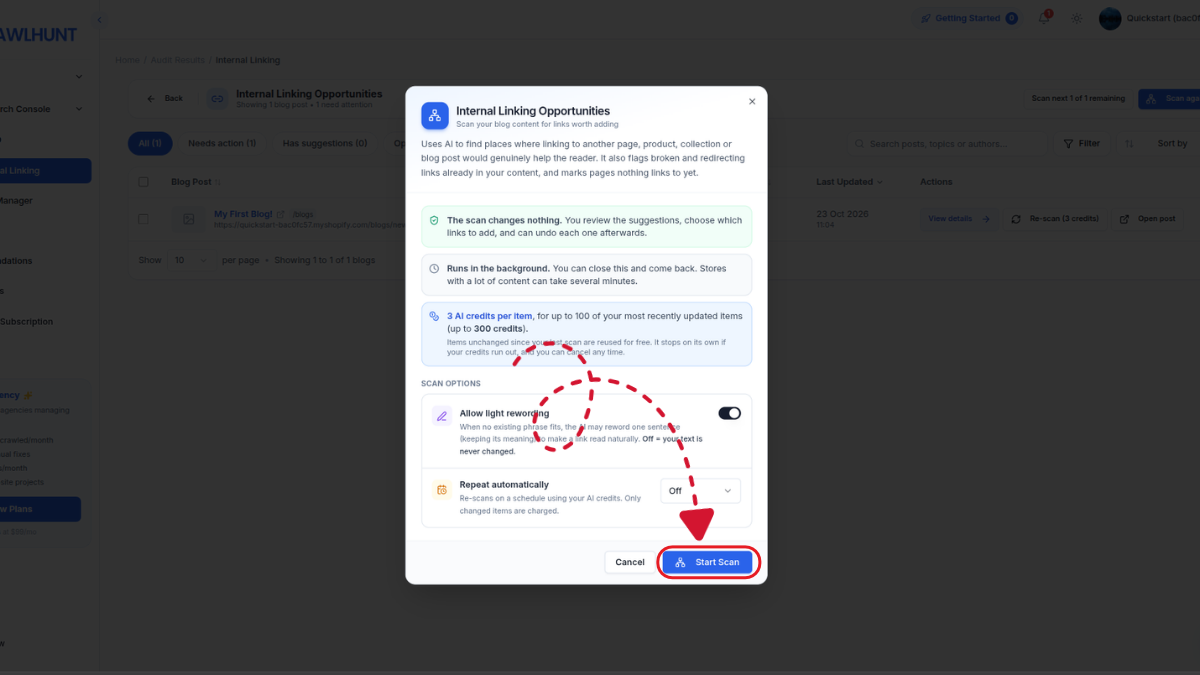
After configuring your preferences, click Scan Now to begin the scanning process.
CrawlHunt uses AI to analyze your website content and identify places where linking to another page could genuinely help the reader. These opportunities can include links to related blog posts, product pages, collections, and other relevant website pages.
During this process, CrawlHunt also helps identify existing internal linking issues, including broken links, links that redirect to other URLs, and pages that do not have inbound internal links. Think of it as a quick technical SEO audit of your internal link structure.
These findings give you a clearer understanding of how your website's pages are connected and which areas may need attention. Once the scan is complete, you can review the results before making changes.
Step 5. Review the Scan Results and Internal Linking Status
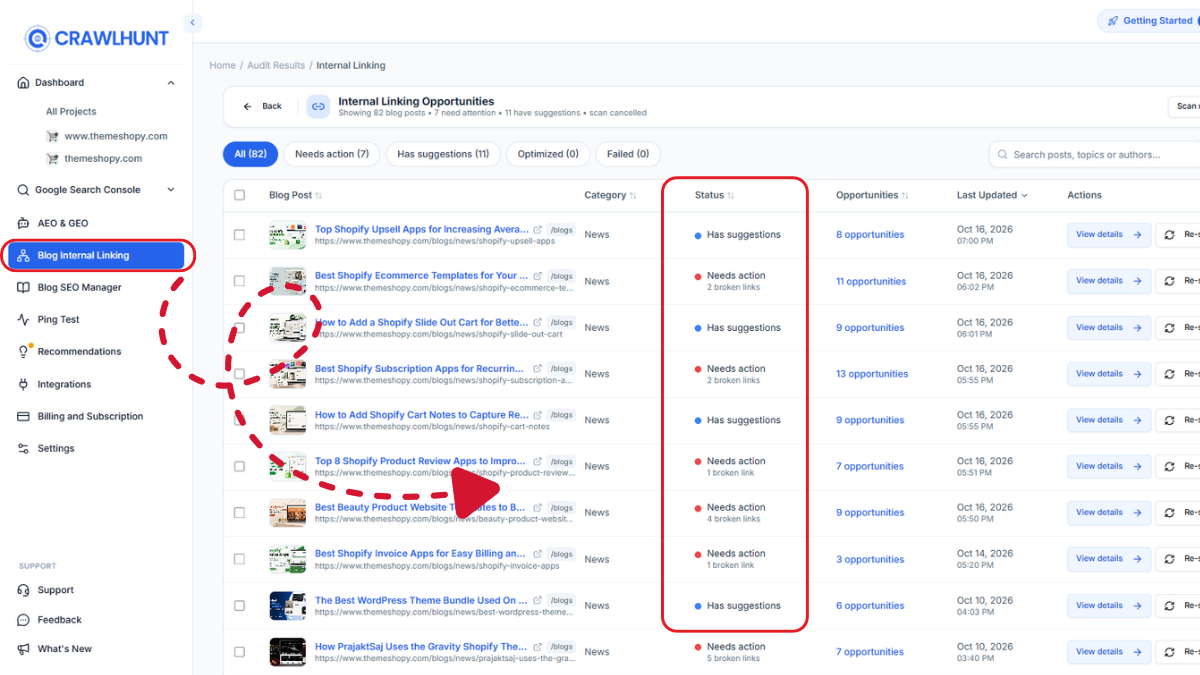
After the scan finishes, CrawlHunt takes you to a results page displaying the internal linking opportunities and their current statuses, along with the last updated date.
This overview helps you understand the results of the scan and identify the recommendations you want to review first. Instead of opening every blog post or product page individually, you can use the centralized results to navigate to specific opportunities. Select the relevant block and click View Details to open its recommendations.
This step is important because automated internal linking should not be based solely on the number of links added. Reviewing the available opportunities helps you prioritize connections that are relevant to the content and useful for visitors.
Step 6. Examine the Anchor Text, Target Page, and Relevance
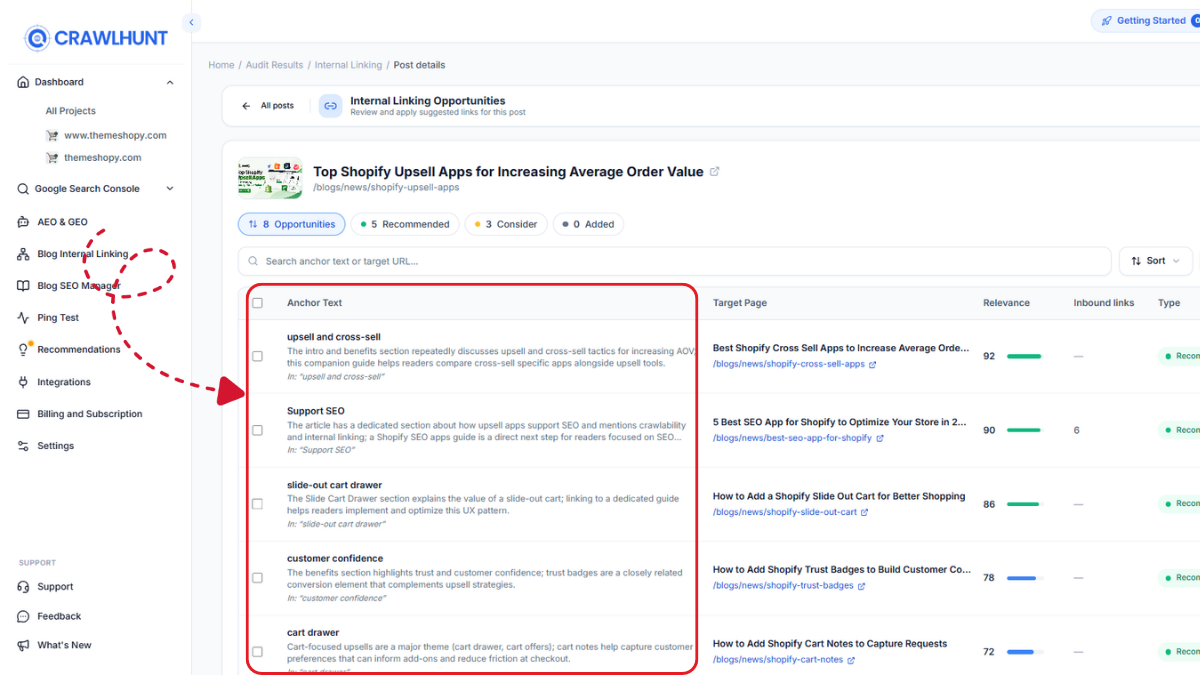
Inside the details view, CrawlHunt displays information about each internal linking opportunity, helping you evaluate the suggested connection before applying it.
The available fields include:
- Anchor Text: Shows the text that will be used for the internal link. Review whether it describes the destination accurately and fits naturally within the content.
- Target Page: Identifies the destination URL for the proposed link. Confirm that it leads to the appropriate blog post, product, collection, or other page.
- Relevance: Helps you assess the relationship between the existing content and the proposed destination. Prioritize links that provide additional information or context to readers.
- Inbound Links: Provides information about links pointing to the relevant page, helping you identify pages that may need stronger internal connections.
- Type: Identifies the category of the internal linking item so you can understand the recommendation you are reviewing.
- Actions: Provides options to apply individual recommendations or apply all recommendations in the selected block.
Reviewing these details helps you make informed decisions about the links you add. A good internal link should connect related content, use descriptive anchor text, and provide value to someone reading the page.
Step 7. Apply Individual Recommendations or Use Bulk Apply
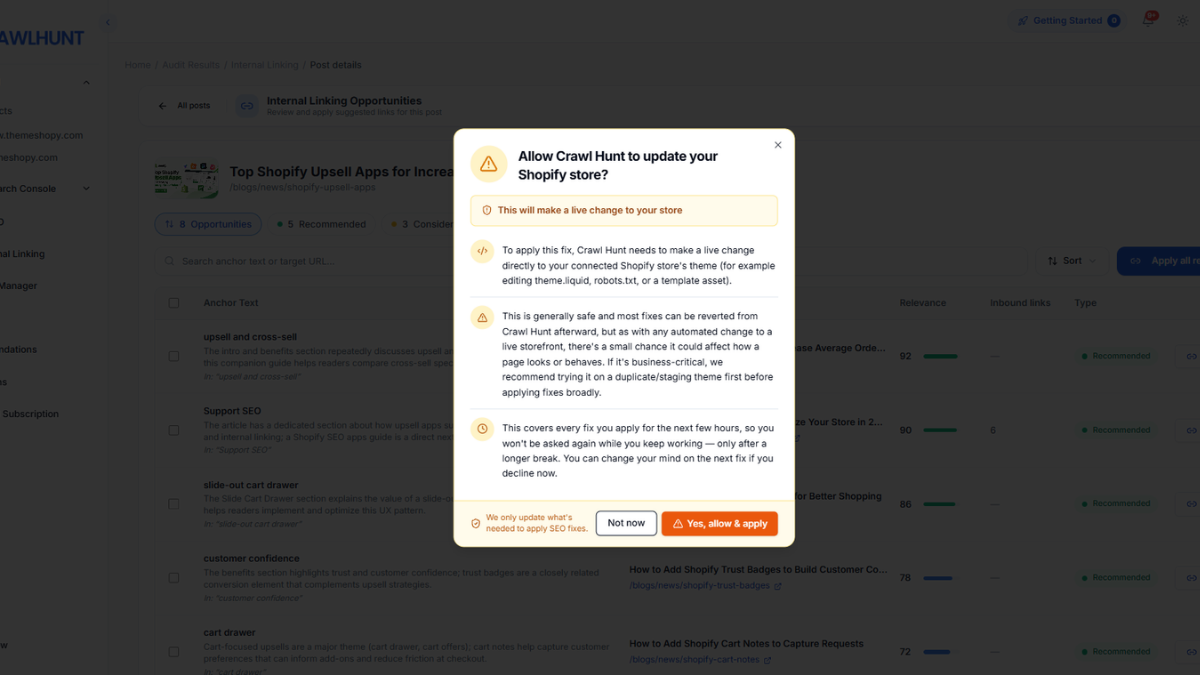
Once you have reviewed the recommendations, CrawlHunt allows you to implement internal links individually or in bulk.
Apply individual recommendations
If you want greater control over the linking process, select a recommendation and click Apply. This lets you implement links one at a time, which can be useful when reviewing important blog posts, product pages, or other high-priority content.
Apply all recommendations in bulk
If you have reviewed the suggestions and are satisfied with their relevance, use Apply All the Recommendations to implement the recommendations in the selected block together. Bulk application is especially helpful for websites with a large amount of content, where adding each link separately would require considerable time and effort.
CrawlHunt applies the selected internal linking changes to your website in real time, helping you implement relevant connections without manually editing every page.
Step 8. Review the Updated Internal Links
After applying the recommendations, review the updated content to confirm that the internal links work as expected. Check whether the anchor text reads naturally, each link points to the correct destination, and the surrounding content remains clear and useful.
You should also revisit important pages periodically to identify new linking opportunities as your website grows. Regular reviews also help you steer clear of common SEO mistakes such as orphan pages and outdated links. New articles, products, and collections may create additional opportunities to connect related content.
By combining AI-powered discovery, recommendation review, and automated implementation, CrawlHunt helps simplify internal linking management and makes it easier to maintain a well-connected website.
Conclusion
Internal linking is an important part of SEO that helps search engines discover website pages, understand content relationships, and navigate your website structure. However, finding relevant linking opportunities, choosing suitable anchor text, and maintaining existing links can become time-consuming as your website grows.
CrawlHunt simplifies this process with its AI Internal Linking Tool, helping you identify relevant connections between blog posts, product pages, collections, and other website pages. With features such as light rewording, scheduled rescans, detailed recommendations, and bulk link application, you can manage internal linking more efficiently while maintaining control over your content.
By automating repetitive tasks and reviewing relevant recommendations, you can build a better-connected website and make useful content easier for visitors and search engines to discover.
Frequently Asked Questions
1. What is an AI internal linking tool?
An AI internal linking tool uses artificial intelligence to identify relevant opportunities to link pages within a website. It helps website owners connect related blog posts, product pages, collections, and other content while reducing the manual effort required to manage internal links.
2. What is the best AI internal linking tool for SEO?
The best AI internal linking tool should identify relevant linking opportunities, suggest appropriate anchor text, and simplify link implementation. CrawlHunt helps automate internal linking by scanning website content, presenting recommendations, and allowing users to apply links individually or in bulk. If you run an online store, it is also worth comparing the best Shopify SEO apps for how well they handle internal links.
3. Why is internal linking important for SEO?
Internal linking helps search engines discover website pages, understand relationships between related content, and navigate the site's structure. It also guides visitors to useful information, improves navigation, and helps distribute link equity across relevant pages.
4. How does CrawlHunt automate internal linking?
CrawlHunt scans website content to identify potential internal linking opportunities. It provides details such as suggested anchor text, target pages, relevance, and inbound links. You can review recommendations and apply them individually or use the bulk application option to implement multiple links.
5. Can AI automatically choose relevant anchor text?
Yes. AI-powered internal linking tools can analyze surrounding content and suggest descriptive anchor text for relevant destination pages. CrawlHunt also offers an optional light rewording setting that allows AI to make minor sentence changes to accommodate a suitable link naturally.
6. Can CrawlHunt identify broken internal links?
CrawlHunt can flag broken and redirecting links within existing content. Identifying these issues helps website owners locate links that may lead visitors to unavailable pages or through unnecessary redirects, allowing them to review and improve their internal linking structure.
7. What are orphan pages, and how can AI help identify them?
Orphan pages are pages that have no inbound internal links from other pages on the website. They may be harder for visitors and search engine crawlers to discover through normal website navigation. CrawlHunt identifies pages without inbound internal links, helping you find opportunities to connect them with relevant content.
8. Can I add internal links in bulk using CrawlHunt?
Yes. CrawlHunt lets you apply recommendations individually or use the Apply All the Recommendations option within a selected block. Bulk application can save time when managing internal linking opportunities across websites with large amounts of content.
9. Does automated internal linking improve Google rankings?
Automated internal linking can support SEO by improving content discovery, strengthening relationships between related pages, and helping search engines navigate a website. However, adding internal links does not guarantee higher rankings. Results depend on overall content quality, relevance, website structure, and other ranking factors.
10. How often should I audit my website's internal links?
You should review your internal links regularly, particularly when publishing new content, updating existing pages, changing URLs, or removing products and articles. CrawlHunt supports scheduled rescans using AI credits, helping you identify new linking opportunities and review changes as your website evolves.