Running a website without proper SEO tracking can feel confusing. You publish blogs, update pages, and add products, but still wonder why some pages rank while others never appear on Google. Many website owners face this problem because they do not fully understand how search engines view their websites. This is where Google Search Console Integration becomes important. It helps you monitor website performance, track keyword rankings, identify indexing problems, and improve technical SEO. With the right integration, you can discover what is helping your rankings and what is stopping your website from growing. Tools like CrawlHunt make this process easier by combining Google Search Console data with AI-powered SEO analysis, website crawling, issue detection, and optimization tools. This helps businesses improve search visibility, organic traffic, and overall website performance in a simpler and smarter way.
What Is Google Search Console?
Google Search Console is a free SEO tool provided by Google that helps website owners monitor and improve their website performance in Google Search results. It allows users to track keyword rankings, website traffic, indexing status, and technical SEO issues. With Google Search Console, you can see how Google crawls and indexes your pages, identify broken links, submit XML sitemaps, and fix indexing errors. It also provides important insights about Core Web Vitals, mobile usability, and search performance. Website owners, bloggers, SEO experts, and online businesses use this tool to improve search visibility and increase organic traffic. Google Search Console is an essential platform for managing technical SEO, optimizing website performance, and understanding how your website appears in Google search results.
Why Google Search Console Matters for SEO
Search engines prioritize websites that are technically optimized, properly indexed, and user-friendly. Search Console helps you maintain all these SEO factors efficiently.
Major SEO benefits include:
1. Better Indexing:
Google can discover and index pages faster when your sitemap and URLs are properly submitted. Strong crawlability and indexability ensure that Google can discover, understand, and rank your most important website pages efficiently.
2. Keyword Performance Insights
You can track:
- Top-performing keywords
- Search impressions
- Average position
- CTR performance
- Low-performing pages
3. Technical SEO Monitoring
Search Console helps detect:
- Crawl errors
- Redirect issues
- Duplicate pages
- Canonical errors
- Mobile usability problems
A regular technical SEO audit helps identify indexing issues, crawl errors, and website performance problems before they impact search rankings.
4. Improved Organic Traffic
By fixing SEO errors and optimizing pages based on Search Console data, websites often experience significant ranking improvements.
5. Core Web Vitals Optimization
Google uses page experience as a ranking signal. Search Console helps identify:
- Slow-loading pages
- CLS issues
- Mobile performance problems
How Google Search Console Integration Works?
Google Search Console Integration helps connect your website data directly with SEO tools and platforms for better monitoring, analysis, and optimization. It allows website owners to track search performance, indexing issues, and technical SEO problems from one centralized dashboard.
- Website Connection: Google Search Console Integration connects your website with Google’s search database using a verified Google account and property access.
- Data Synchronization: Once connected, the system automatically syncs important SEO data such as impressions, clicks, keyword rankings, indexing status, and crawl reports.
- Search Performance Tracking: The integration helps monitor organic traffic, top-performing keywords, average ranking positions, and click-through rates directly from Google search results.
- Indexing Monitoring: It tracks which pages are indexed, excluded, or facing indexing errors so website owners can quickly identify visibility issues.
- Technical SEO Analysis: Integrated SEO platforms can analyze crawl errors, broken links, redirect issues, canonical problems, duplicate content, and mobile usability errors using Search Console data. If Search Console reports URL issues, learning how to fix crawl errors can help improve page indexing and ensure search engines access important content.
- Keyword Insights: The system provides keyword-level insights that help optimize content strategy, improve rankings, and discover new SEO opportunities.
- Crawl Data Access: Google Search Console Integration allows SEO tools to fetch crawl reports and understand how Google bots interact with website pages.
- Core Web Vitals Monitoring: It helps monitor page experience metrics including loading speed, visual stability, and mobile responsiveness that impact SEO rankings.
- Sitemap Management: Website owners can submit XML sitemaps and monitor sitemap indexing performance through integrated platforms.
- AI-Powered SEO Optimization: Platforms like CrawlHunt use integrated Search Console data to generate AI-powered SEO suggestions, metadata improvements, and technical fixes.
- Issue Detection System: The integration enables automatic detection of SEO problems such as missing meta tags, thin content, duplicate pages, and indexing issues.
- Performance Reporting: Website owners can generate SEO reports, export data, and monitor website health from a single dashboard. Combining Search Console insights with an on page SEO audit report helps uncover optimization opportunities related to content, metadata, and keyword targeting.
- Content Optimization Support: Search Console keyword data helps improve content relevance, internal linking, metadata optimization, and overall search visibility.
- Real-Time SEO Monitoring: The integration continuously updates website performance data so SEO teams can track changes and respond quickly to ranking fluctuations.
- Better Decision Making: With centralized SEO insights, businesses can make smarter optimization decisions based on actual Google search data.
Google Search Console Integration simplifies SEO management by combining search performance insights, technical SEO monitoring, and optimization tools into one streamlined workflow. It helps businesses improve rankings, increase organic traffic, and maintain a healthier website for long-term SEO success.
How to Connect Google Search Console with CrawlHunt
One of the easiest and most effective ways to monitor your website’s SEO performance is by connecting Google Search Console directly with CrawlHunt. This integration helps you track indexing issues, keyword rankings, crawl performance, technical SEO errors, and website visibility from a single dashboard. Once connected, CrawlHunt can automatically analyze your website data and provide AI-powered SEO recommendations to improve your rankings and overall search performance.
Pricing: CrawlHunt provides three flexible pricing plans. The Basic plan is completely free forever ($0) for beginners. The Growth plan costs $59 per month and suits expanding businesses. For agencies and enterprises, the Scale plan is available at $149 per month with premium capabilities.
Step 1: Login to CrawlHunt

To begin the setup process, visit the official CrawlHunt website and log in to your account dashboard. After signing in, you will gain access to all SEO tools, website audit systems, crawl reports, technical SEO monitoring features, and AI optimization tools available inside the platform. If you are a new user, you can create an account and add your website before starting the integration process. Logging into the dashboard is the first step toward enabling advanced SEO tracking and automation for your website.
Step 2: Open the CrawlHunt Dashboard
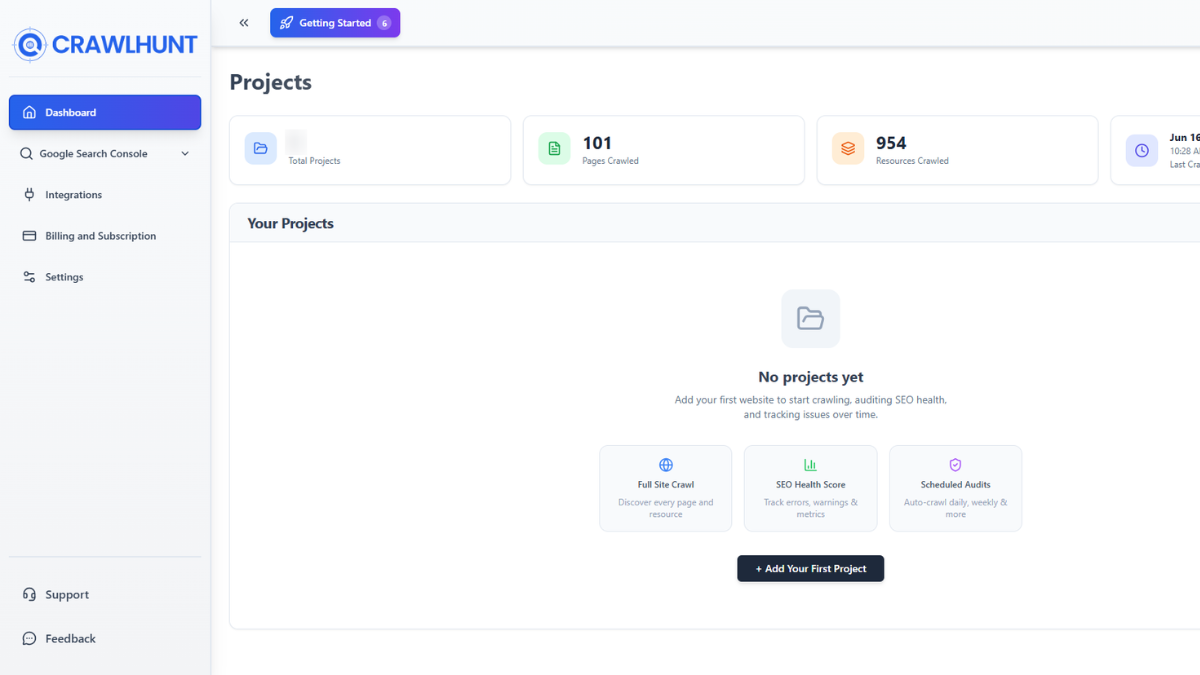
Once you successfully log in, you will be redirected to the main CrawlHunt dashboard. This dashboard acts as the central control panel where you can monitor your website’s SEO health, crawl reports, indexing data, and optimization tasks. The dashboard includes access to tools such as website crawling, issue detection, redirect management, metadata optimization, Core Web Vitals monitoring, and reporting systems. From here, you can manage all technical SEO activities and monitor your website performance in one place.
Step 3: Click on Google Search Console
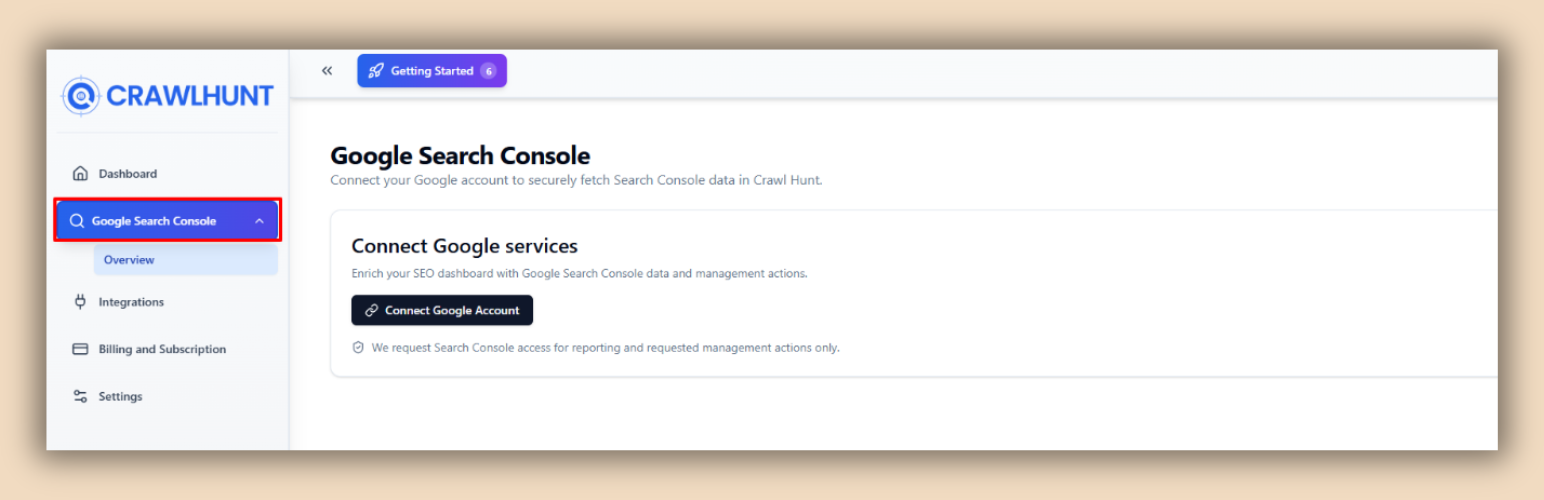
Inside the dashboard, locate the Google Search Console section available in the SEO integrations or tools area. Click on the Google Search Console option to begin the integration setup. This process allows CrawlHunt to connect directly with your Search Console property and access valuable SEO insights from Google. The integration enables CrawlHunt to analyze indexing status, search performance, keyword data, click-through rates, impressions, and crawl issues related to your website. Connecting Search Console with CrawlHunt helps centralize your SEO data for easier management and optimization.
Step 4: Connect Your Google Account
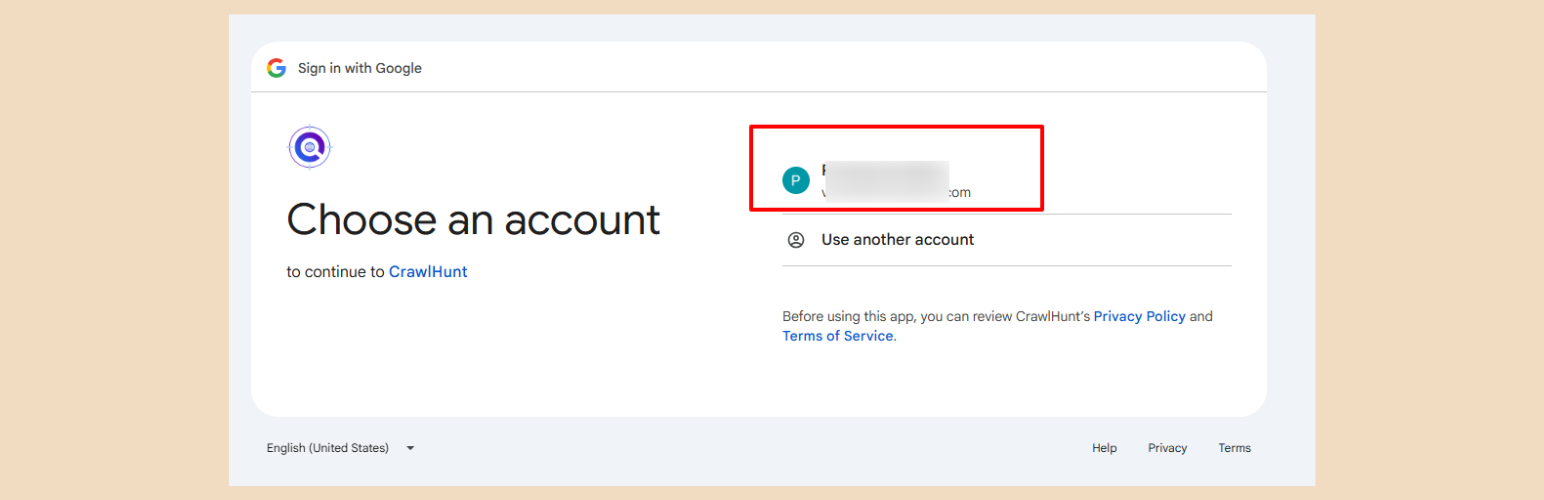
After clicking the Google Search Console option, you will be asked to authorize your Google account. Use the same Google account that is already connected to your Search Console property. CrawlHunt securely requests permission to access your Search Console data so it can analyze website performance and technical SEO issues. Once you approve the authorization request, CrawlHunt will establish a secure connection with your Google account and start syncing your Search Console information. This connection allows the platform to fetch real-time SEO insights directly from Google.
Step 5: Select Your Website Property
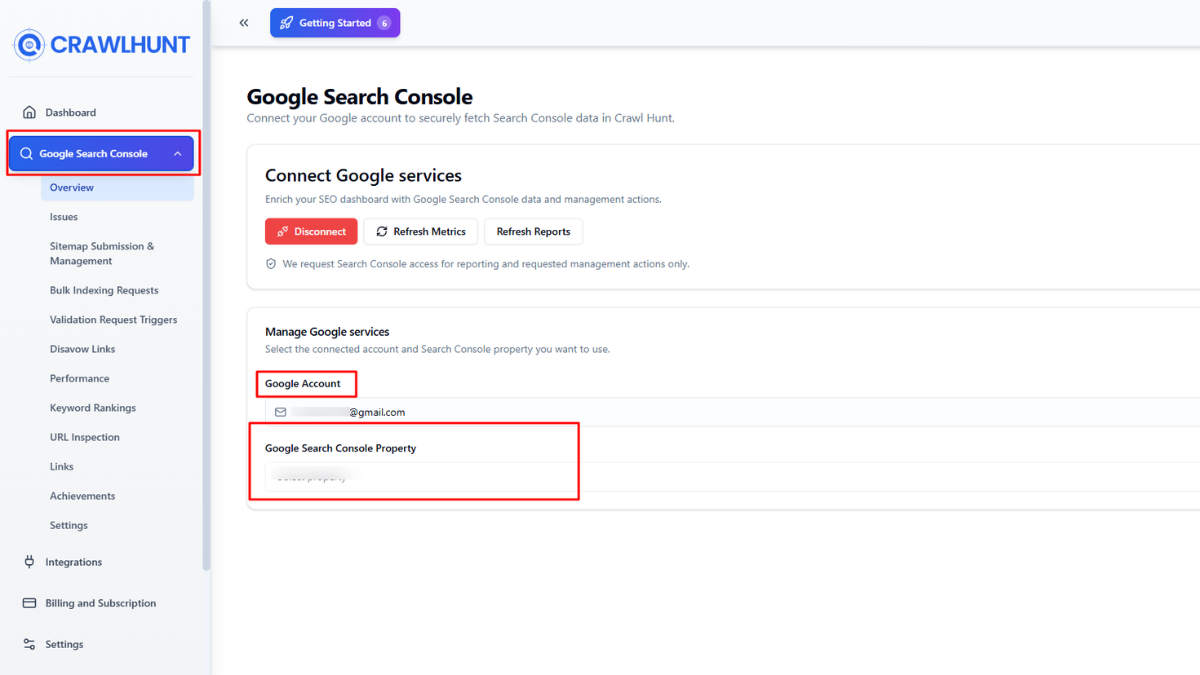
After authorization is completed, CrawlHunt will display a list of verified Search Console properties associated with your Google account. Select the correct website property that you want to connect with the platform. Choosing the right property ensures that CrawlHunt receives accurate indexing data, keyword reports, and crawl statistics for your website. Once selected, the platform links your website with its SEO audit engine, enabling deeper analysis of technical SEO issues, on-page optimization opportunities, and indexing performance.
Step 6: Start SEO Analysis
Once the integration is complete, CrawlHunt automatically begins analyzing your website using data from Google Search Console combined with its own AI-powered crawling system. The platform starts crawling your URLs, detecting technical SEO issues, monitoring indexing health, analyzing keyword performance, and identifying optimization opportunities. CrawlHunt can also track broken links, redirect issues, duplicate content, missing metadata, image SEO problems, and Core Web Vitals performance. With continuous monitoring and AI-powered recommendations, the platform helps improve your website’s search visibility, organic traffic, and overall SEO rankings.
Conclusion
Google Search Console Integration is an important part of modern SEO strategy. It helps website owners monitor organic traffic, keyword rankings, indexing status, technical SEO issues, and website performance directly from Google. By using Search Console data, businesses can improve search visibility, fix crawl errors, optimize content, and increase website rankings. When combined with AI-powered SEO tools like CrawlHunt, the process becomes faster and more effective.
Businesses looking for the best SEO audit tool often integrate Search Console data with platforms like CrawlHunt for deeper technical analysis and AI-powered recommendations. CrawlHunt helps detect broken links, duplicate content, missing meta tags, Core Web Vitals issues, and other technical SEO problems while providing AI-based optimization suggestions. This improves website health, user experience, and overall search engine optimization. Whether you run an eCommerce store, blog, or business website, using Google Search Console Integration with advanced SEO audit tools can help increase organic traffic, improve website indexing, and support long-term digital growth.
Frequently Asked Questions (FAQs)
Can Google Search Console detect technical SEO issues?
Yes, Google Search Console can detect many technical SEO problems including crawl errors, indexing issues, mobile usability problems, duplicate pages, and Core Web Vitals issues that may impact search rankings.
How does CrawlHunt work with Google Search Console?
CrawlHunt connects directly with Google Search Console to combine search performance data with AI-powered SEO audits and technical analysis. It helps detect SEO issues, optimize metadata, monitor indexing, analyze keywords, and improve overall website performance.
Does CrawlHunt help fix SEO issues automatically?
Yes, CrawlHunt includes AI-powered SEO tools that can generate meta titles, meta descriptions, image ALT text, redirect suggestions, and content optimization recommendations. It also supports bulk SEO fixes for faster optimization.
Can Google Search Console help eCommerce websites?
Yes, eCommerce websites benefit greatly from Google Search Console because it helps monitor product page indexing, crawl issues, duplicate content, mobile SEO, and search visibility for products and collections.
What are Core Web Vitals in Google Search Console?
Core Web Vitals are performance metrics used by Google to measure page experience. They include loading speed, visual stability, and page responsiveness, which can affect SEO rankings and user experience.
Why are some pages not indexed in Google Search Console?
Pages may not be indexed due to thin content, duplicate content, crawl restrictions, incorrect canonical tags, noindex tags, or low-quality pages. Search Console helps identify these indexing problems.
Can Google Search Console increase organic traffic?
Google Search Console itself does not directly increase traffic, but it helps website owners improve SEO by identifying issues and optimization opportunities that can lead to higher rankings and increased organic traffic over time.