URL slugs are a small part of your page address, but they show up everywhere: in search results, in the browser bar, in shared links and in every internal link that points to the page. When URL slugs are messy, with capital letters, spaces, random symbols or long strings of words, pages become harder to read, harder to share and harder to manage.
The good news is that fixing URL slugs is one of the easier on-page SEO jobs, as long as you change them safely. This guide explains what URL slugs and page handles are, which problems to look for, and how to find and fix them step by step with CrawlHunt, including how to keep the old URL working with a redirect.
What Are URL Slugs and Page Handles?
A URL slug is the last part of a page address that identifies the page. In https://example.com/pages/our-services, the slug is our-services.
Some platforms use a different word for the same thing. Shopify calls it a handle, so the handle of the page above is also our-services. In CrawlHunt's audit results it is labelled Page Handle. WordPress calls it a slug, and Magento calls it a URL key. In this guide, "URL slug" and "page handle" mean the same thing.
Why URL Slugs Matter for SEO
Search engines can crawl a page whatever its slug looks like, so URL slugs are not a magic ranking switch. They matter because they affect clarity and consistency:
- Readability: a short, descriptive slug tells people and search engines what the page is about before it loads.
- Click confidence: clean URL slugs look trustworthy when they appear in search results or in a message.
- Consistency: one clear format across the site makes it easier to avoid duplicate URLs, broken internal links and messy redirects.
- Maintenance: URL slugs without spaces or special characters are easier to copy, link and report on.
Treat URL slugs as housekeeping that supports the rest of your technical SEO. Google's own URL structure guidelines recommend simple, readable URLs that use hyphens to separate words. If you are working through a larger list, our technical SEO checklist shows where URL slugs fit.
Common URL Slug Problems
Uppercase letters
URLs are case sensitive, so /pages/Our-Services and /pages/our-services can count as two different addresses. Mixed case makes it easy to end up with two versions of the same page. CrawlHunt reports this as URL: Uppercase.
Spaces
Spaces in a URL are encoded as %20, which turns a readable address into /pages/About%20Us%20Page. These URL slugs are hard to read and easy to break when a link is copied. CrawlHunt reports this as URL: Contains Space.
Special characters and underscores
Exclamation marks, ampersands and accented characters can cause encoding problems or look untidy, and Google recommends hyphens rather than underscores to separate words. Stick to lowercase letters, numbers and hyphens.
Very long URL slugs
A slug that repeats the page title word for word is hard to read and gets cut off in many places. Keep it as short as it can be while still being descriptive.
Stop words, dates and filler
Words like "a", "the" and "of", and details like the year, add length without adding meaning. A year in a slug also forces you to change the URL when the content is updated.
Duplicated or inconsistent patterns
Doubled hyphens, leading or trailing hyphens, and URL slugs that follow different patterns across the site all make URLs harder to manage.
Bad URL slugs vs good URL slugs
Problem | Bad slug | Better slug |
|---|---|---|
Uppercase |
|
|
Spaces |
|
|
Special characters |
|
|
Too long |
|
|
Doubled hyphens |
|
|
Trailing hyphen |
|
|
Rules for good URL slugs
- Use lowercase letters, numbers and hyphens only.
- Separate words with hyphens, not spaces or underscores.
- Build the slug around the main keyword of the page.
- Keep it short and readable. CrawlHunt's handle check flags handles shorter than 3 or longer than 50 characters.
- Avoid stop words, dates and unnecessary filler.
- Use the same pattern across similar pages.
How to Fix URL Slugs and Page Handles with CrawlHunt
Protect the old URL first
Changing a slug changes the page address. Any link, bookmark or search result that still points to the old address will lead to a "page not found" error unless the old address is sent to the new one. The safe way to do this is a 301 redirect, which tells browsers and search engines that the page has moved permanently. Google's guide to redirects and Google Search recommends permanent redirects when you are sure the change is final.
Skipping this step is the most common mistake when changing URL slugs, and it creates exactly the broken pages described in our guide to fixing 404 errors. Plan the redirect at the same time as you plan the new slug.
Find URL slug issues in your audit
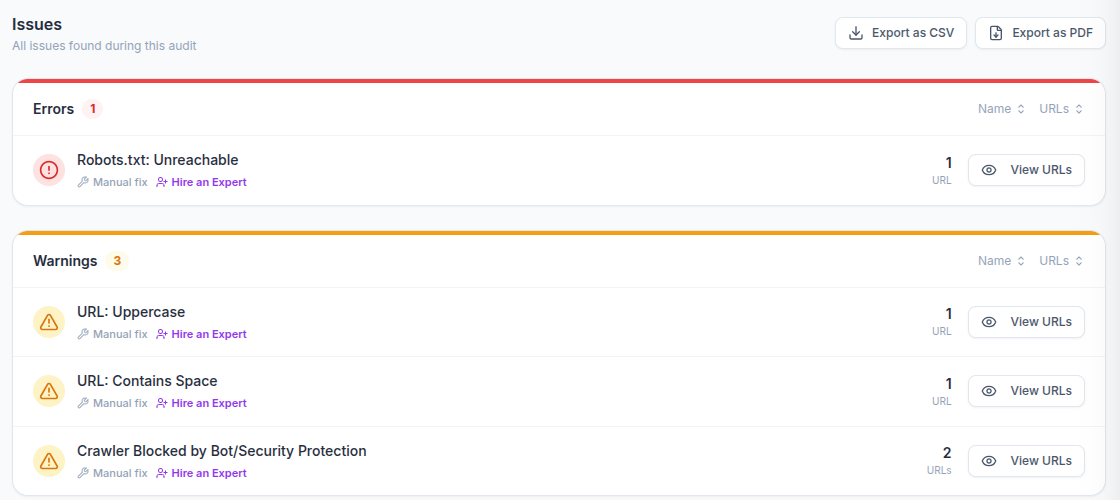
CrawlHunt checks URL paths during every audit. After a scan finishes, open the Issues tab and look under Warnings. Pages with capital letters in the path appear as URL: Uppercase, and pages with spaces in the path appear as URL: Contains Space. The number on the right shows how many URLs are affected, and View URLs lists them.
If you have not run an audit yet, start with our guide on how to perform an SEO audit.
You can change URL slugs directly from the audit results. To apply the change to your live site from CrawlHunt, connect your Shopify, WordPress or Magento store from the Integrations page first. If your site is not connected, CrawlHunt will ask you to connect a platform before it lets you edit, and you can still use the audit to find the slugs and change them in your own CMS.
Step 1: Open the page from Crawled Pages
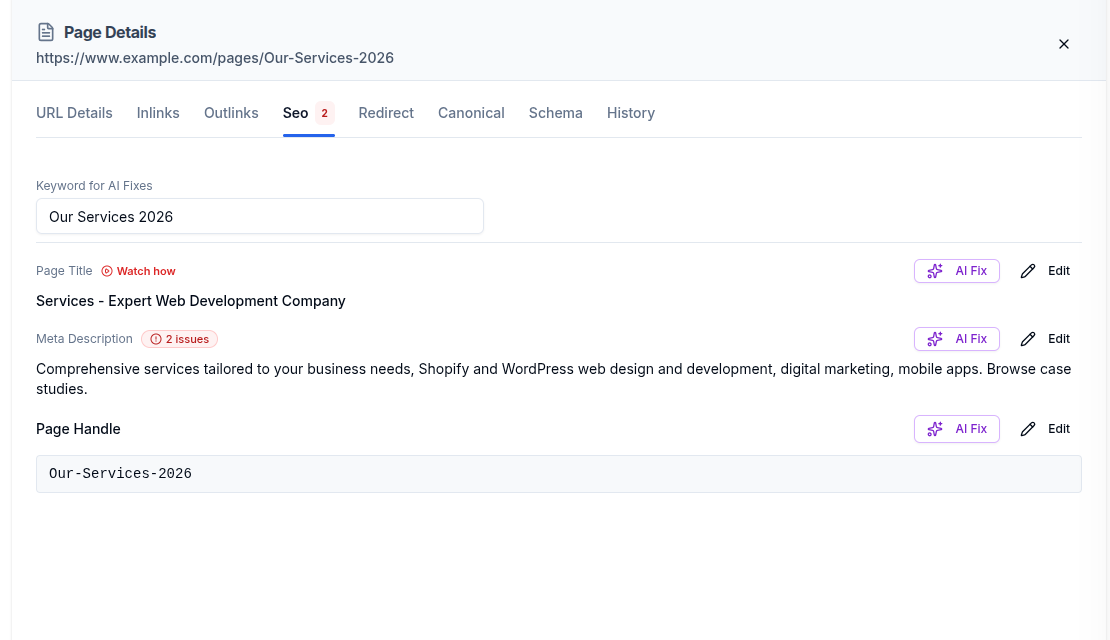
Go to the Crawled Pages tab, find the page you want to fix and click its row. The Page Details panel opens at the bottom of the screen.
Step 2: Open the Seo tab
In Page Details, select the Seo tab. It shows the page's title, meta description and Page Handle, each with an AI Fix button and an Edit button. There is also a Keyword for AI Fixes field at the top, which the AI uses as its starting point.
Step 3: Check the slug against the rules
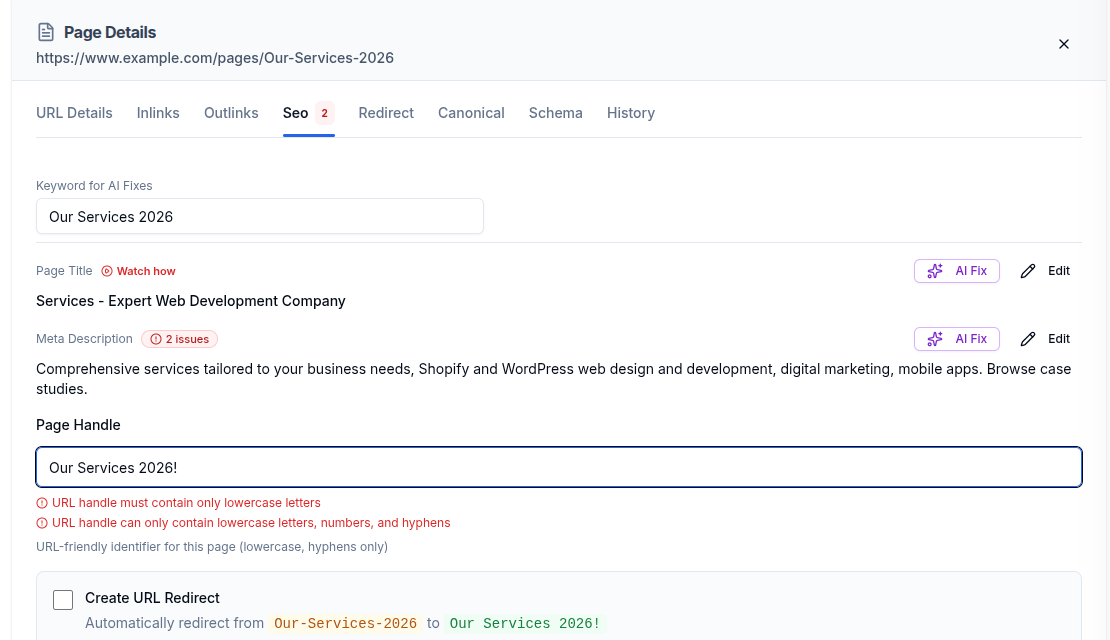
Select Edit next to Page Handle to type a new URL slug yourself. CrawlHunt checks it as you type. For example, typing Our Services 2026! shows that the handle must contain only lowercase letters, and that it can only contain lowercase letters, numbers and hyphens. The Save button stays disabled until the errors are fixed. Other checks flag doubled hyphens, leading or trailing hyphens, stop words and handles that are very short or very long.
Step 4: Let AI suggest a clean slug
If you would rather not write it yourself, set the Keyword for AI Fixes to the main topic of the page and select AI Fix next to Page Handle. CrawlHunt suggests a lowercase, hyphenated slug built from the keyword, aiming for 50 characters or fewer, and you can edit it, regenerate it or cancel. AI fixes use AI credits from your plan.
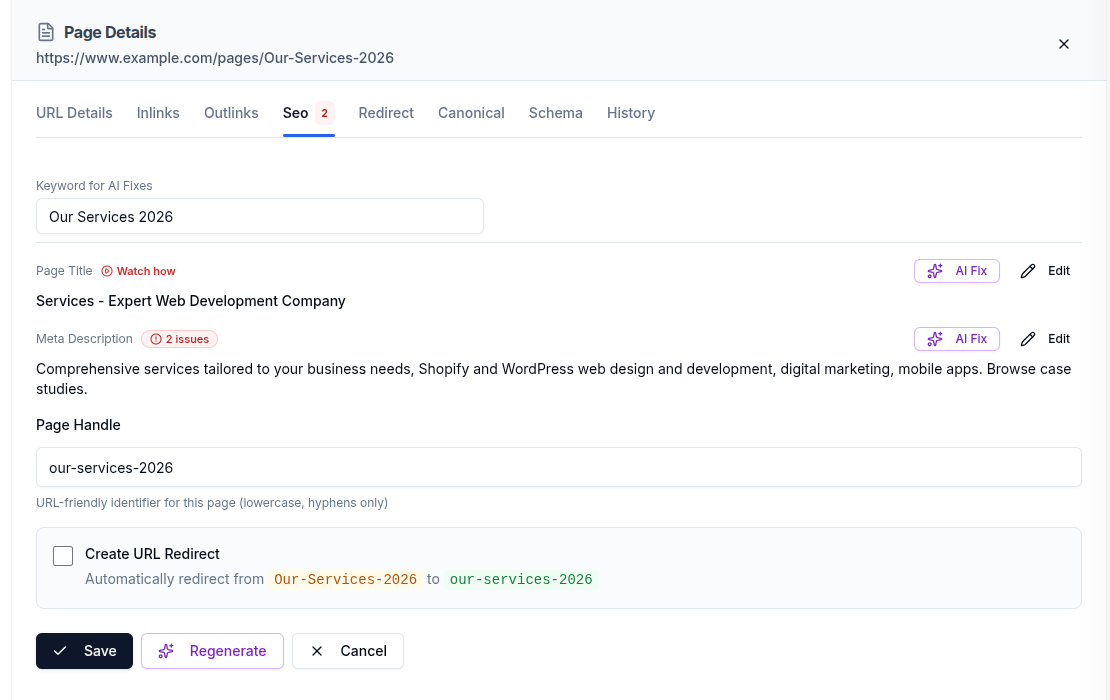
Step 5: Create a redirect from the old URL
When the new slug differs from the old one, a Create URL Redirect option appears. It shows the redirect it will create, from the old handle to the new one. Tick it before you save. On Shopify stores, CrawlHunt creates the redirect in your store for you. On other platforms, add the 301 redirect in your platform or server so the old address keeps working.
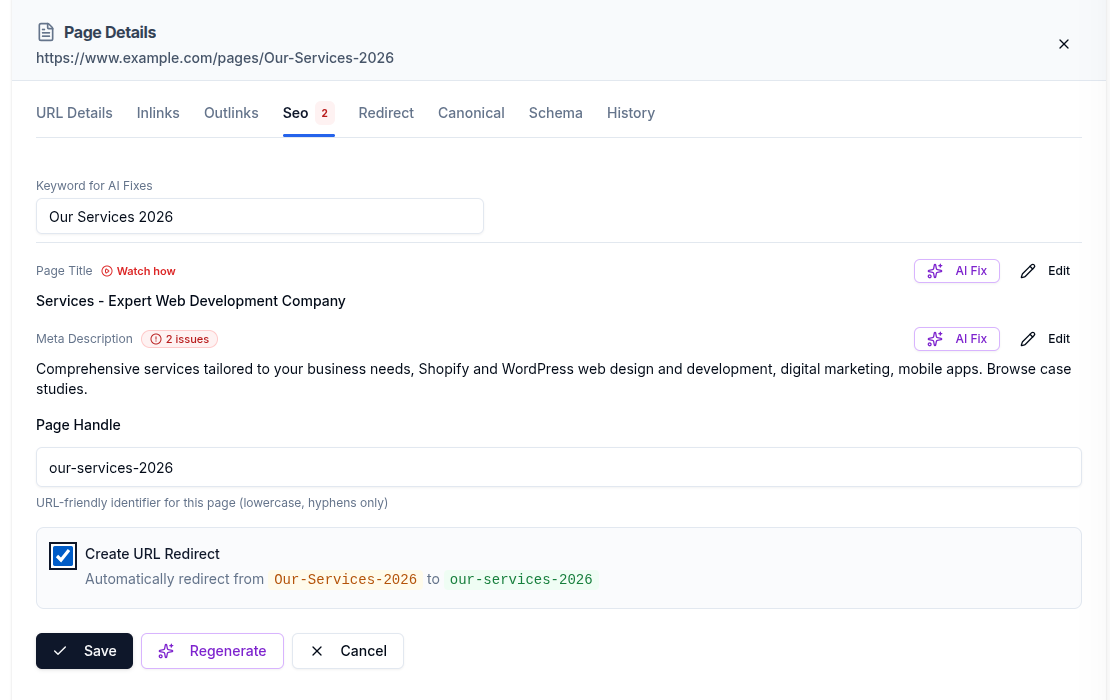
Step 6: Save the change
Select Save. CrawlHunt confirms with a "Page handle updated successfully" message and shows the new handle. Changes are recorded in the page's SEO history, so you can undo one if you need to.
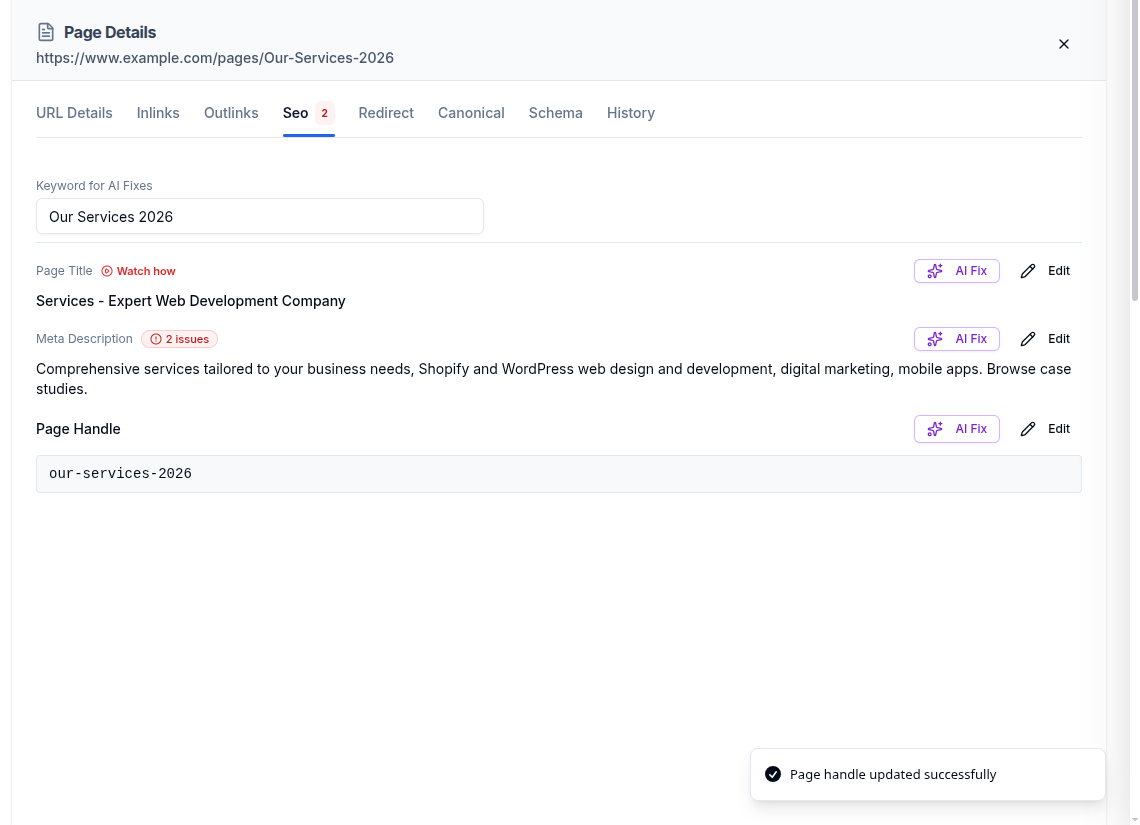
Step 7: Update links and rescan
Update internal links that still use the old slug where you can, because linking straight to the final URL is cleaner than relying on a redirect. Our guide to internal and external links explains why. Then run the audit again to confirm the URL warnings are gone and that no new errors appeared.
Which URL Slugs to Fix First and Mistakes to Avoid
Priority order
Priority | What to look for | Recommended action |
|---|---|---|
High | Spaces or special characters in the slug | Fix now and add a 301 redirect from the old URL. |
High | Uppercase letters that create two versions of a page | Move to the lowercase version, redirect the old one and check canonical tags. |
Medium | Very long slugs on important pages | Shorten around the main keyword when you next update the page. |
Low | Stop words or dates in older pages with steady traffic | Leave alone unless you are already changing the page. |
As a rule, fix errors that break or duplicate URLs first. Cosmetic cleanups on old, well-linked pages can wait, because every slug change carries some risk.
Mistakes to avoid
- Changing a slug without a redirect. This sends visitors and search engines to a 404 page.
- Changing URL slugs in bulk without a plan. Fix the most important pages first and check each batch.
- Keeping the old URL in links. Update internal links so they point to the new address.
- Forgetting canonical tags. If two versions of a URL exist, make sure the canonical points to the one you want. See our guide to canonical tag issues.
- Stuffing keywords. A slug should describe the page, not repeat the keyword.
- Changing URLs that already work. A readable, lowercase slug does not need to be rewritten just to follow a trend.
Conclusion
Clean URL slugs make pages easier to read, share and manage. Look for uppercase letters, spaces, special characters and long handles, change them to short lowercase URL slugs separated by hyphens, and always protect the old URL with a 301 redirect. With CrawlHunt you can find URL slug problems in an audit, check a new handle against the rules, generate a suggestion with AI, and create the redirect from the same screen.
Frequently Asked Questions
What is the difference between a URL slug and a page handle?
They are the same thing. "URL slug" is the general term for the last part of a URL. "Handle" is Shopify's name for it, and CrawlHunt shows it as Page Handle.
Does changing a URL slug hurt SEO?
Changing a slug without a redirect can, because the old address stops working and any links or search results pointing to it lead to an error. With a 301 redirect from the old URL to the new one, the page keeps working at its new address.
Should URL slugs be lowercase?
Yes. Lowercase URL slugs avoid duplicate versions of the same page and are easier to type and share. CrawlHunt flags uppercase letters in a URL path as a warning.
How long should a URL slug be?
Short enough to read at a glance. CrawlHunt's handle check flags handles shorter than 3 characters or longer than 50 characters, and its AI suggestions aim for 50 characters or fewer.
Can CrawlHunt change my URL slugs for me?
You choose the new slug yourself or use the AI suggestion, then save it from the audit results. Live changes need a connected Shopify, WordPress or Magento store. Redirects are created automatically on Shopify, while other platforms need the redirect added in the platform.