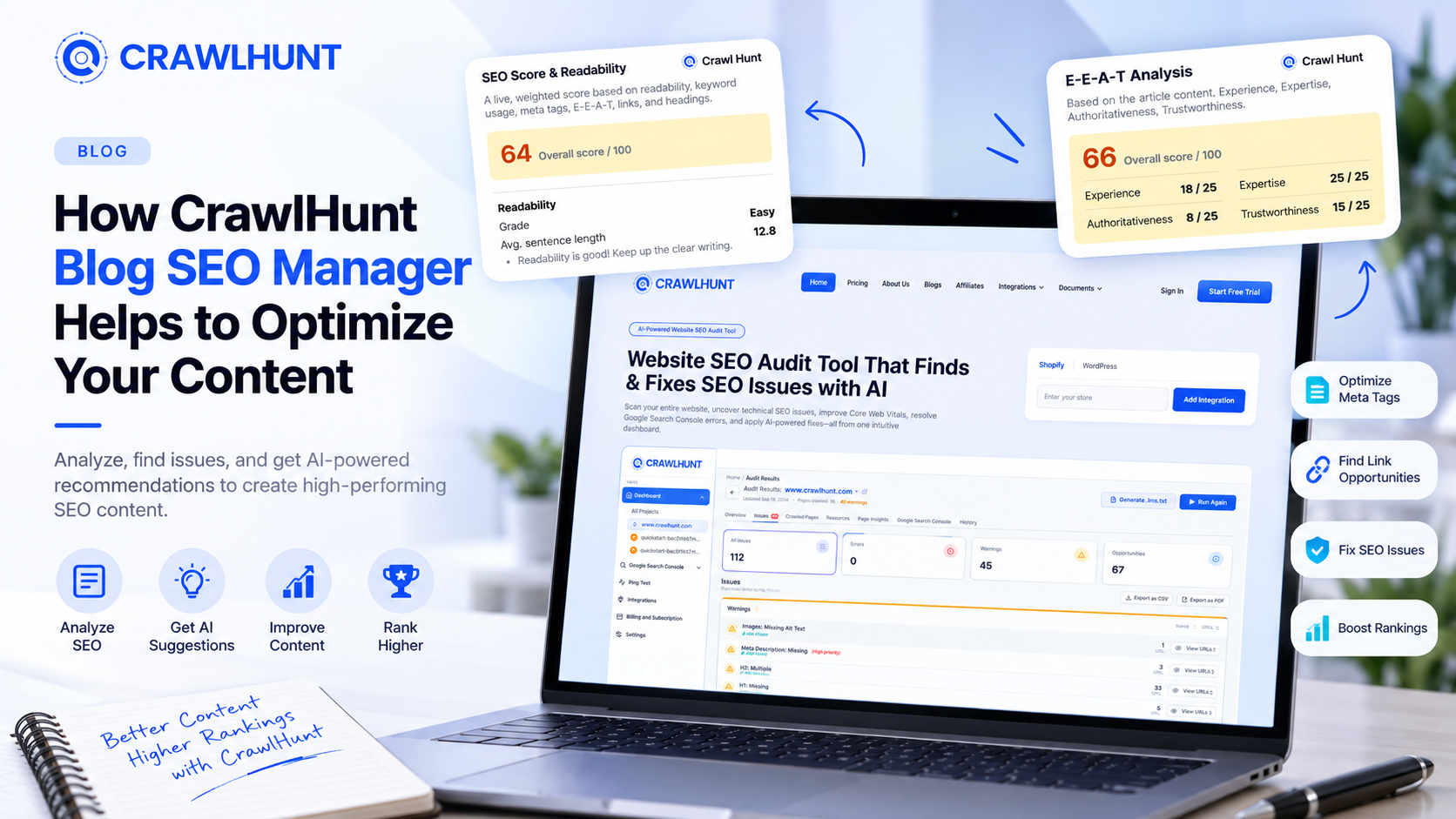
Publishing a blog on Shopify is easy, but making sure that content is optimized for search engines takes more effort. From readability and keyword usage to metadata, internal linking, and content quality, several elements can influence how effectively a blog performs in search. CrawlHunt Blog SEO Manager brings these optimization tasks directly into the Shopify dashboard, giving store owners a simpler way to review and improve their content without switching between multiple SEO analysis tools.
For Shopify merchants who want to manage multiple optimization tasks from one place, an All In One SEO Tool can simplify content analysis, metadata management, internal linking, and ongoing blog improvements.
It combines content analysis with optimization assistance, helping merchants identify weaknesses and make useful improvements before or after publishing. In this blog, we will explore how CrawlHunt Blog SEO Manager helps optimize Shopify blog content effectively.
What Is CrawlHunt Blog SEO Manager?
CrawlHunt Blog SEO Manager is a Shopify-focused content optimization feature that allows merchants to analyze, manage, and improve their blog SEO directly from the Shopify dashboard. Instead of checking content with several separate SEO tools, store owners can review important optimization factors from one place while editing their blog posts.
The Blog SEO Manager analyzes the content of a Shopify blog and provides an overall SEO assessment based on factors such as readability, keyword usage, metadata, links, and content quality. It helps identify areas that may need improvement and provides actionable suggestions that merchants can review before updating their content.
Key Features of CrawlHunt Blog SEO Manager
CrawlHunt Blog SEO Manager brings several important content optimization tools into one place inside the Shopify dashboard. Instead of checking blog content separately for readability, keywords, metadata, links, and E-E-A-T, merchants can review these elements while working on the article itself. This makes it easier to identify SEO gaps, make improvements, and keep blog optimization organized.
4.1 SEO Score & Readability Analysis
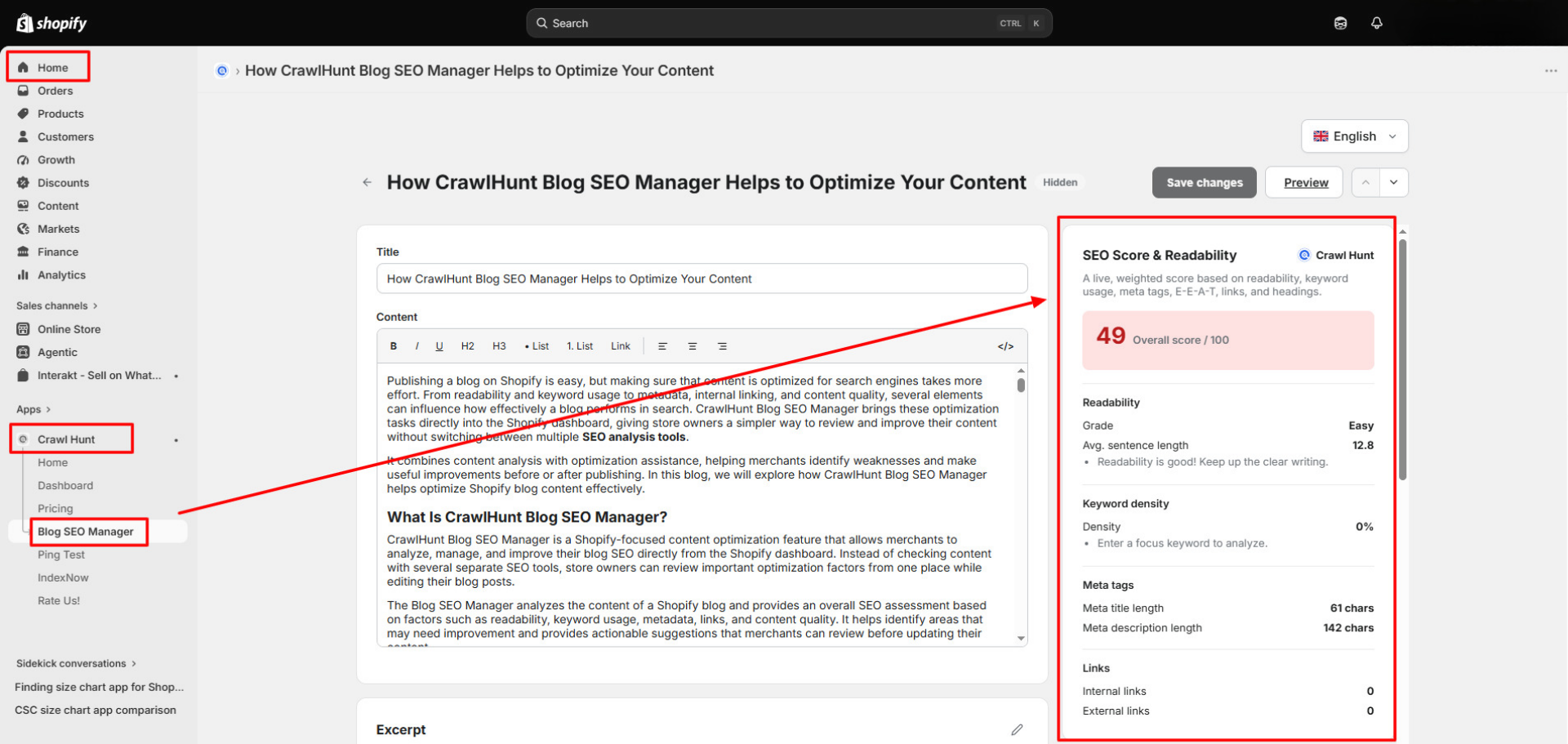
The SEO Score & Readability Analysis gives you a quick overview of how well your blog content is optimized. CrawlHunt evaluates multiple on-page factors and presents an overall score, helping you understand whether the article needs further improvement. It works much like an on page SEO audit report for a single blog post, without the need to run a separate audit.
The readability section also checks how easy the content is for visitors to understand. Long and complicated sentences can make articles difficult to follow, while clearer writing can improve the overall reading experience.
With this analysis, you can review:
- Overall SEO Score: See a combined optimization score for the blog post.
- Readability Grade: Understand whether the content is easy or difficult to read.
- Average Sentence Length: Identify content containing unnecessarily long sentences.
- Improvement Suggestions: Receive recommendations for making the article clearer and better optimized.
This gives content writers and Shopify merchants a simple way to identify weaknesses before publishing or updating a blog.
4.2 Keyword Density Analysis
Using the right keyword is important, but repeating it excessively can make content unnatural. CrawlHunt's keyword density analysis helps you understand how frequently your target keyword appears throughout the article.
You simply enter the focus keyword you want to target, and CrawlHunt analyzes its usage within the content. This makes it easier to determine whether the keyword has been used sufficiently or whether it appears too frequently.
The feature helps you:
- Add the primary focus keyword for the article.
- Check the percentage of keyword usage throughout the content.
- Identify whether the keyword needs to be included more naturally.
- Avoid excessive repetition and keyword stuffing.
- Keep the article focused on its main search topic.
Keyword density should be used as a guidance metric rather than a fixed ranking formula. The objective should always be to use keywords naturally while keeping the content useful for readers.
4.3 Meta Tag Optimization
Meta titles and meta descriptions help search engines and potential visitors understand what a page is about. CrawlHunt Blog SEO Manager allows you to review these important SEO elements directly while managing the blog.
The system displays the current meta information along with its character count, making it easier to identify metadata that may be too long or too short.
You can monitor:
- Meta Title Length: Review whether the title remains within the recommended range.
- Meta Description Length: Check the length of the search description.
- Content Relevance: Ensure metadata accurately represents the article.
- Keyword Usage: Include the primary topic naturally where appropriate.
This allows you to optimize how your blog may appear in search results without leaving the Shopify dashboard.
4.4 AI Meta Title & Description Generator
Writing a concise SEO-friendly title and description can take time, especially when managing multiple blog posts. CrawlHunt includes an AI Meta Title & Description Generator that can create suggestions based on the content of your article.
Rather than writing metadata completely from scratch, you can generate a suggestion and then review it before saving.
The AI generator can help you:
- Generate an SEO-focused meta title based on the article.
- Create a relevant meta description.
- Reduce the time required to prepare metadata manually.
- Edit generated suggestions to match your brand voice or keyword strategy.
- Save the final metadata directly to your Shopify blog.
AI-generated metadata should still be reviewed before publishing to ensure that it accurately represents the page.
4.5 Internal and External Link Analysis
Links provide useful context for both visitors and search engines. Internal links connect related content across your own website, while external links can reference relevant resources outside your store.
CrawlHunt Blog SEO Manager shows the number of internal and external links currently present in your article, giving you a quick overview of its linking structure.
This analysis can help you:
- Check whether the blog contains internal links.
- Review the number of external links.
- Identify articles with limited internal linking.
- Connect readers to relevant products, collections, pages, and other articles.
- Review external references used within the content.
A well-planned linking structure can also make it easier for visitors to discover related content across your Shopify store.
4.6 AI-Powered Internal Link Suggestions
Finding relevant internal linking opportunities manually becomes difficult as your website grows. CrawlHunt simplifies this process with AI-powered internal link suggestions.
The feature analyzes the article and looks for relevant content within your store that may be suitable for contextual linking. Instead of manually searching through dozens or hundreds of pages, you can use AI suggestions as a starting point.
CrawlHunt can help you:
- Analyze the context of your current blog post.
- Find relevant internal linking opportunities.
- Discover related blog posts, pages, or products.
- Add links where they naturally support the content.
- Build a stronger connection between related pages.
Relevant internal links, as part of a solid internal linking strategy, can improve navigation while helping search engines better understand relationships between pages on your website.
4.7 E-E-A-T Content Analysis
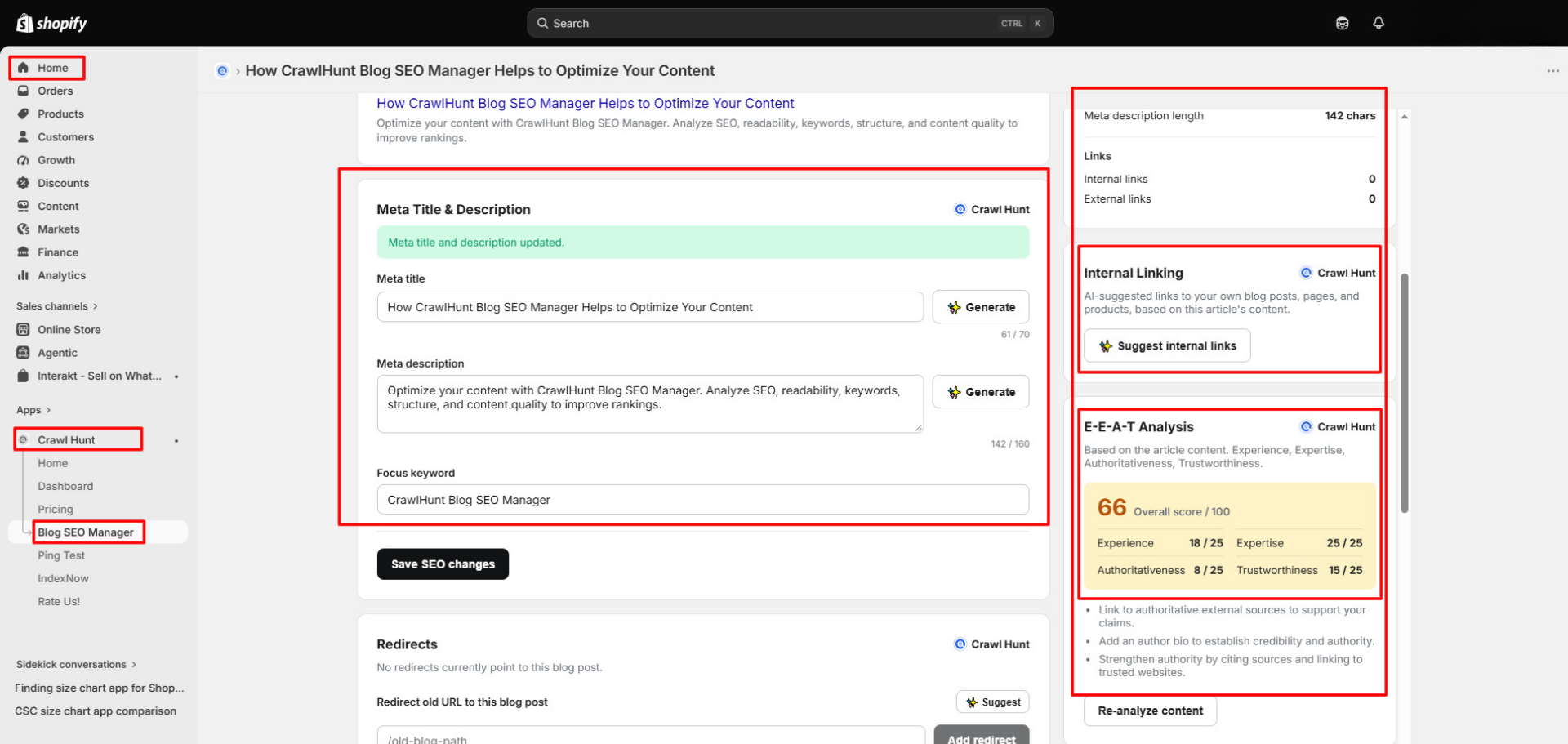
CrawlHunt Blog SEO Manager also includes an E-E-A-T Analysis that reviews content across four areas: Experience, Expertise, Authoritativeness, and Trustworthiness.
The feature provides an overall E-E-A-T score along with individual scores for each component. It can also highlight areas where the article could provide stronger credibility signals.
The analysis considers:
- Experience: Whether the content demonstrates relevant first-hand or practical experience.
- Expertise: Whether the article demonstrates sufficient subject knowledge.
- Authoritativeness: Whether credibility and authoritative references are adequately represented.
- Trustworthiness: Whether the content provides signals that help readers trust the information.
CrawlHunt may also recommend actions such as adding author information or referencing reliable sources where appropriate. These recommendations help content teams think more carefully about quality and credibility rather than focusing only on keyword optimization.
4.8 AI Redirect Management
Changing or replacing blog URLs without handling the old URL can leave visitors landing on broken pages. Learning how to fix crawl errors caused by changed URLs is an important part of blog maintenance. CrawlHunt includes redirect management within the Blog SEO Manager so these changes can be handled more conveniently.
If an older URL should lead visitors to the current article, you can create that redirect directly from the blog management interface.
The feature allows you to:
- Enter an old blog URL that should be redirected.
- Use AI assistance to suggest a suitable redirect where supported.
- Point outdated URLs toward relevant active content.
- Manage redirects without moving between different tools.
- Reduce unnecessary broken paths when blog URLs change.
Redirects should always point to the most relevant replacement page rather than an unrelated destination.
4.9 Blog Image and ALT Text Optimization
Images can improve the visual quality of a blog, but they should also be properly described for accessibility and SEO. CrawlHunt Blog SEO Manager gives you access to the blog image information and its corresponding ALT text.
An AI Image Alt Text Generator can help Shopify merchants create descriptive image text more efficiently, but each suggestion should accurately reflect the image and avoid unnecessary keyword repetition.
From the same interface, you can review whether the image has a useful description and update it when necessary.
You can:
- Review the blog's featured image.
- Check its current ALT text.
- Add descriptive ALT text where appropriate.
- Describe the actual purpose or subject of the image.
- Improve image accessibility for users who rely on screen readers.
Rather than filling ALT text with keywords, it is better to write a short, accurate description of what the image represents.
4.10 Blog Organization Settings
Shopify SEO optimization also involves keeping content properly organized and maintained. CrawlHunt Blog SEO Manager provides access to several Shopify blog settings alongside the optimization tools.
Implementing Schema Markup for SEO can help search engines interpret structured information about your content, although displaying rich results depends on Google's eligibility requirements and other factors.
You can manage important information such as:
- Author: Assign or review the author associated with the article.
- Blog: Select the appropriate Shopify blog or category.
- Tags: Add relevant tags to organize related articles.
- Visibility: Control whether the blog post is visible or hidden.
- Theme Template: Review the template being used for the article.
Having these settings alongside SEO analysis makes CrawlHunt Blog SEO Manager more than a scoring tool. It provides a centralized workspace where Shopify merchants can review, optimize, organize, and update important elements of their blog content from one dashboard.
How to Optimize a Shopify Blog Using CrawlHunt Blog SEO Manager
Optimizing a Shopify blog usually involves checking several different elements, including keywords, metadata, readability, internal links, images, E-E-A-T signals, and redirects. CrawlHunt Blog SEO Manager brings these tasks together inside your Shopify dashboard, allowing you to analyze and improve a blog post without repeatedly switching between different SEO tools.
Here is the complete step-by-step process for optimizing your Shopify blog using CrawlHunt Blog SEO Manager.
1. Open CrawlHunt Inside Shopify
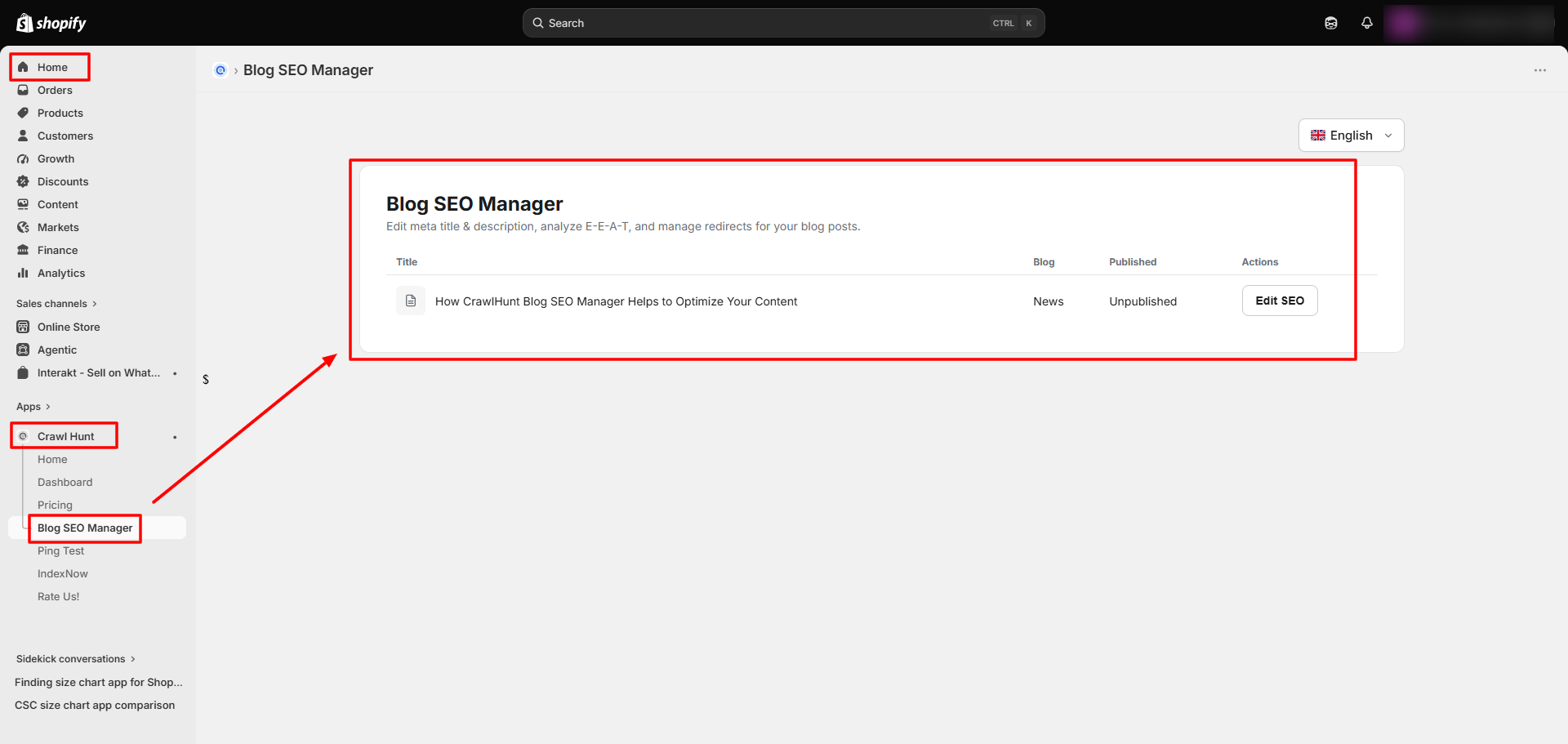
Start by logging in to your Shopify Admin dashboard. From the left-side navigation, go to Apps and open the CrawlHunt Shopify app.
Once CrawlHunt opens, you can access its SEO tools directly from your Shopify environment. This keeps your content management and SEO optimization workflow in one place.
From here, you can:
- Access CrawlHunt without leaving Shopify.
- Manage SEO-related tasks for your store.
- Review available CrawlHunt optimization features.
- Work on existing Shopify content directly.
Note: Enabling Two Factor Authentication for your Shopify account adds an extra layer of security by requiring an additional verification step when signing in, helping protect access to your store and its content.
2. Go to Blog SEO Manager
Inside the CrawlHunt app, select Blog SEO Manager from the navigation menu. This section is specifically designed for managing and optimizing Shopify blog posts.
The Blog SEO Manager provides access to your blog content along with SEO analysis and optimization controls. Instead of simply displaying an SEO report, it gives you tools that can help you make changes to the article.
The dashboard brings together important areas such as SEO scoring, readability, metadata, keywords, linking, E-E-A-T analysis, images, and redirects.
3. Select the Blog You Want to Optimize
Next, choose the Shopify blog post you want to analyze. You can optimize an existing article that is already published or work on content that still needs improvement before being promoted.
Once you open the article, CrawlHunt displays the blog content inside the editor along with the available SEO analysis on the same screen.
Before making changes, review:
- Blog title
- Main content
- Current metadata
- Featured image
- Author
- Blog category
- Tags
- Visibility settings
This gives you a complete picture of the article before starting the optimization process.
4. Add Your Focus Keyword
Enter the main keyword you want the article to target in the Focus Keyword field.
For example, if your article is about Shopify clothing themes, your focus keyword might be Shopify Clothing Themes.
Adding a focus keyword allows CrawlHunt to evaluate how effectively that keyword is being used throughout your content. Your focus keyword should accurately represent the main topic and search intent of the article.
When choosing your keyword:
- Select one clear primary keyword.
- Make sure it is closely related to the article topic.
- Avoid targeting unrelated keywords simply because they have search volume.
- Use the keyword naturally rather than forcing it into every paragraph.
- Support it with related terms and relevant subtopics.
Once the focus keyword is added, CrawlHunt can provide more meaningful keyword-related analysis.
5. Review SEO Score & Readability
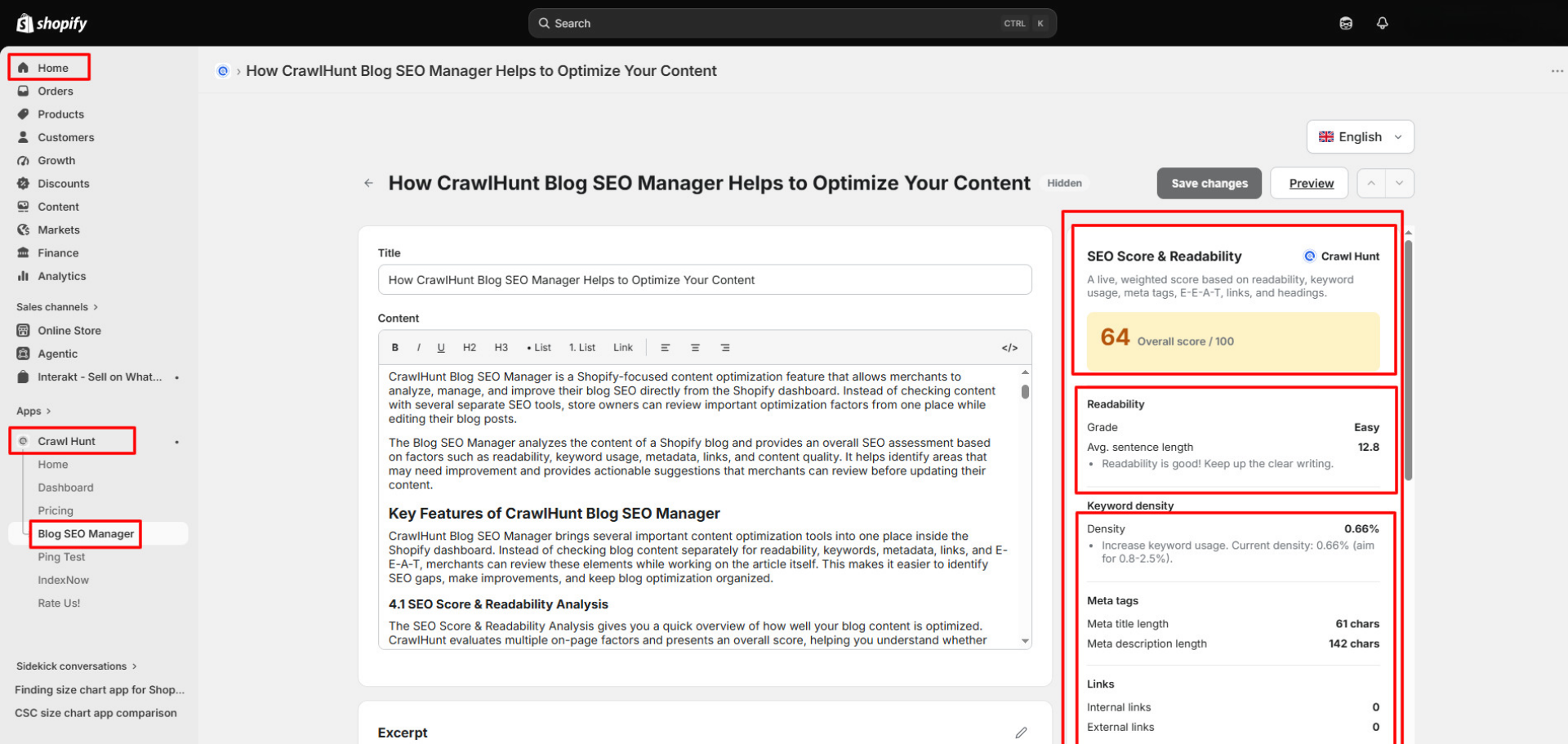
Now check the SEO Score & Readability panel.
CrawlHunt analyzes several elements of the article and provides an overall SEO score. This gives you a quick indication of areas that may require attention rather than requiring you to manually inspect every SEO element separately.
The readability section also evaluates how easy the content is to understand.
Review information such as:
- Overall SEO score
- Readability grade
- Average sentence length
- Readability recommendations
- Content optimization suggestions
If your sentences are consistently long or difficult to understand, consider breaking them into shorter sentences and paragraphs. Use clear headings, simple explanations, and logical sections to make the article easier to scan.
The objective should not simply be to achieve a higher numerical score. Use the score as guidance while ensuring the article remains useful and natural for readers.
6. Check Keyword Density
After adding your focus keyword, review the Keyword Density section.
CrawlHunt calculates how frequently your primary keyword appears within the article. This can help identify content where the keyword is barely mentioned or, conversely, repeated unnecessarily. Overusing the exact phrase is one of the common SEO mistakes to avoid, as it can make the article read unnaturally.
When reviewing keyword usage:
- Make sure the focus keyword appears naturally in important areas.
- Include it where appropriate in the introduction.
- Use it in relevant headings when it makes sense.
- Mention it naturally throughout the article.
- Avoid repeating the exact phrase excessively.
- Use related phrases and semantic variations.
There is no single keyword-density percentage that guarantees better rankings. The content should primarily answer the reader's question while making its main topic clear to search engines.
7. Optimize Meta Title and Description
Scroll to the Meta Title & Description section.
CrawlHunt allows you to review and edit the metadata associated with the blog post. You can see the existing title and description along with their character counts.
Make sure your meta title clearly communicates the article topic while remaining concise. Your meta description should briefly explain what readers will learn from the page and encourage relevant users to visit.
You can either manually edit the metadata or use CrawlHunt's AI generation feature.
For the meta title:
- Include the main topic naturally.
- Make the title clear and specific.
- Avoid unnecessary repetition.
- Keep an eye on the displayed character count.
For the meta description:
- Summarize the page accurately.
- Mention the main topic naturally.
- Explain the value of reading the article.
- Avoid misleading claims.
- Keep the description concise.
You can click Generate to receive an AI-generated suggestion and then edit it before saving.
8. Review Internal and External Links
Next, check the Links section of the SEO analysis.
CrawlHunt displays the number of internal and external links found in your article. This makes it easier to identify blog posts that may have very few links or no meaningful internal connections.
Internal links can connect readers to:
- Related blog posts
- Product pages
- Collection pages
- Important landing pages
- Other useful resources within your store
External links can be used when referencing trustworthy third-party information or supporting important statements.
Avoid adding links simply to increase the link count. Every link should provide additional value to the reader.
9. Generate AI Internal Link Suggestions
Instead of manually searching your website for pages to link, use the Suggest Internal Links feature.
CrawlHunt analyzes the context of your article and identifies potentially relevant pages, products, or blog posts from your Shopify store.
Click Suggest Internal Links and review the recommendations provided by CrawlHunt.
Before adding a suggested link, verify that:
- The destination is genuinely relevant.
- The anchor text fits naturally into the sentence.
- The linked page provides additional value.
- You are not repeatedly linking to the same page unnecessarily.
- The link makes sense within the surrounding context.
AI suggestions can significantly reduce the time required to find internal linking opportunities, but the final link should still be reviewed before it is added.
10. Check Your E-E-A-T Score
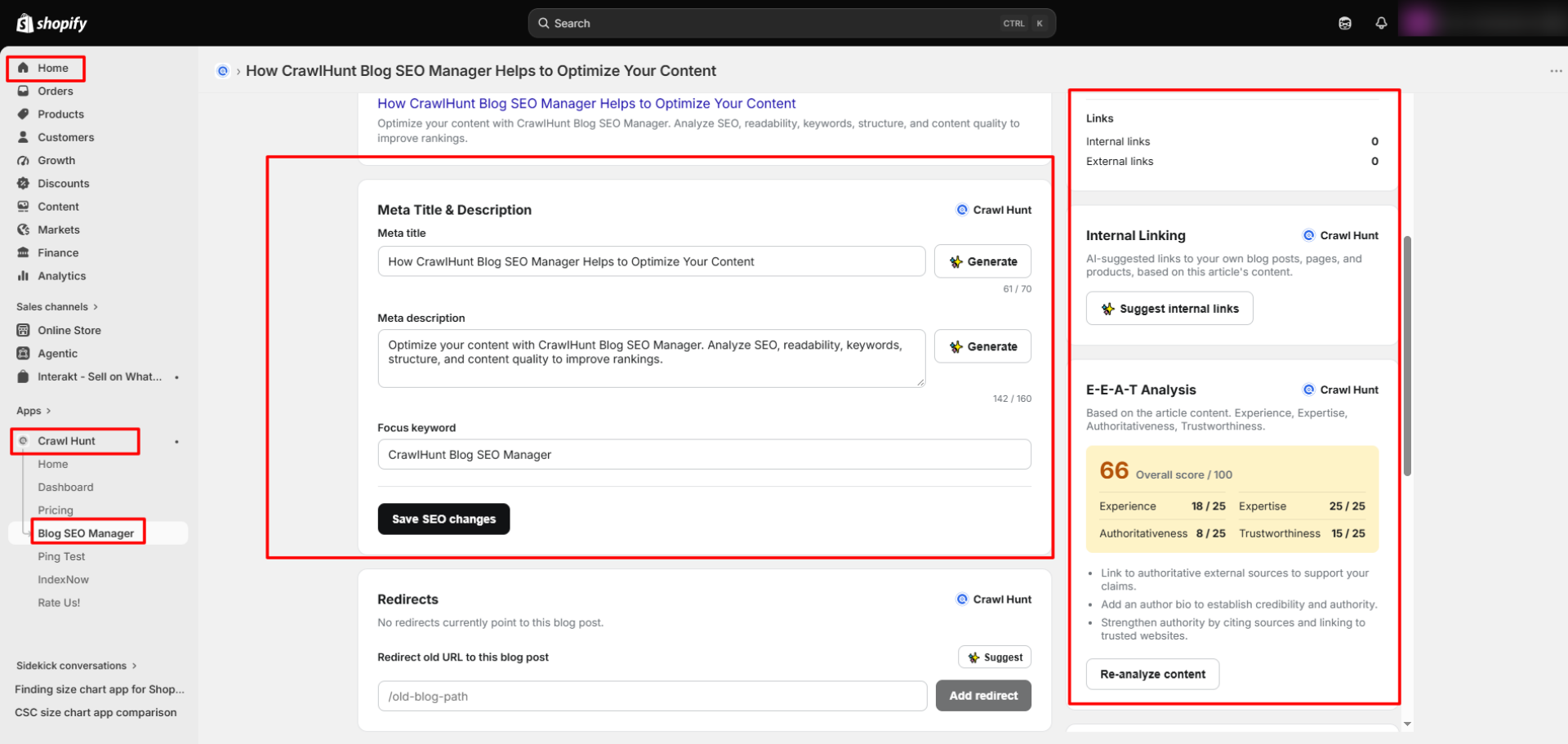
Now move to the E-E-A-T Analysis section.
CrawlHunt analyzes the article across four areas:
Experience, Expertise, Authoritativeness, and Trustworthiness.
You will see an overall E-E-A-T score along with individual scores for these areas. CrawlHunt may also provide recommendations for strengthening weaker areas.
For example, you may receive suggestions to:
- Add clear author information.
- Include first-hand experience where relevant.
- Provide supporting examples.
- Reference reliable sources.
- Explain claims in greater detail.
- Improve transparency and credibility.
Use these recommendations to improve the overall quality and usefulness of your content rather than treating E-E-A-T as simply another keyword-related metric.
After making improvements, you can re-analyze the content to see how the article has changed.
11. Optimize Images and ALT Text
Images should also be reviewed as part of your content optimization process.
Inside the Blog SEO Manager, check the featured image and its existing ALT text. ALT text helps describe the purpose or content of an image, particularly for accessibility.
Write ALT text that clearly explains what the image shows.
For example:
Instead of:
image-123
Use:
Best Shopify Themes for Clothing Brands
However, avoid adding keywords to ALT text when they do not accurately describe the image.
Good ALT text should be:
- Descriptive
- Concise
- Relevant to the image
- Useful for accessibility
- Written naturally
Reviewing image information alongside the blog content makes it easier to avoid publishing important images without meaningful descriptions.
12. Configure Redirects If Required
CrawlHunt Blog SEO Manager also includes a Redirects section.
Redirects become useful when an older URL needs to send visitors to the current blog post. This may happen when you change a blog URL, consolidate older articles, replace outdated content, or migrate an existing article.
Enter the old URL in the redirect field and point it toward the appropriate current blog post.
CrawlHunt can also provide AI-powered suggestions where applicable.
When creating redirects:
- Redirect an old URL to the closest relevant replacement.
- Avoid redirecting unrelated pages simply to preserve traffic.
- Check that the destination URL is active.
- Avoid unnecessary redirect chains.
- Review the suggested destination before applying it.
Proper redirect management can help visitors reach useful content instead of encountering broken pages.
13. Save Your SEO Changes
Once you have reviewed your keywords, metadata, links, E-E-A-T recommendations, images, and other settings, click Save SEO Changes.
Before saving, quickly review the article again to make sure AI-generated or manually edited information is accurate.
Check that:
- The focus keyword is correct.
- Meta title and description are finalized.
- Internal links point to relevant pages.
- Images have useful ALT text.
- Author and organizational information are correct.
- Redirects point to appropriate destinations.
- Content still reads naturally after optimization.
Saving the changes ensures the SEO information you have updated is applied to the Shopify blog.
14. Preview and Publish or Update the Blog
Finally, use the Preview option to review how the article looks before making it live.
Do not evaluate SEO alone. Make sure the actual reading experience is also good. Check the formatting, headings, links, images, spacing, and overall content flow.
Once everything looks correct, publish the article or update the existing blog post.
After publishing, you can return to CrawlHunt Blog SEO Manager whenever you need to reassess or improve the article.
With this workflow, CrawlHunt Blog SEO Manager allows Shopify merchants to move from content analysis to actual optimization within the same dashboard. Rather than relying on separate tools for readability, metadata, keyword analysis, E-E-A-T, internal linking, images, and redirects, you can manage the major elements of Shopify blog optimization from one centralized interface.
Conclusion
CrawlHunt Blog SEO Manager gives Shopify merchants a simpler way to improve blog content without relying on several separate SEO tools. From SEO scoring and readability checks to keyword analysis, metadata optimization, internal linking, E-E-A-T review, image ALT text, and redirects, everything can be managed from one dashboard. The feature helps content teams identify weak areas, make practical improvements, and keep optimization organized before or after publishing.
AI-assisted suggestions can also reduce manual work while still allowing you to review every recommendation before saving. If you want to create more search-friendly, useful, and well-structured Shopify content, CrawlHunt Blog SEO Manager provides a complete workflow for ongoing blog optimization at scale.
FAQs
1. What is CrawlHunt Blog SEO Manager?
CrawlHunt Blog SEO Manager is a feature inside the CrawlHunt Shopify app that helps merchants analyze and optimize blog content using SEO scoring, readability checks, keyword analysis, metadata optimization, internal linking, E-E-A-T analysis, redirects, and other content optimization tools.
2. Can CrawlHunt Blog SEO Manager analyze existing Shopify blogs?
Yes. You can open an existing Shopify blog post inside Blog SEO Manager, review its current SEO performance, identify optimization opportunities, and update important elements such as keywords, metadata, internal links, ALT text, and redirects.
3. Does CrawlHunt generate meta titles and descriptions using AI?
Yes. CrawlHunt includes an AI Meta Title & Description Generator that can create metadata suggestions based on your blog content. You can review and edit the generated title and description before saving them.
4. Can CrawlHunt suggest internal links automatically?
Yes. The AI-powered internal linking feature analyzes your blog content and suggests relevant pages, products, or blog posts from your Shopify store. You can review the recommendations and add suitable contextual links to strengthen your internal linking structure.
5. Does CrawlHunt Blog SEO Manager provide an E-E-A-T analysis?
Yes. CrawlHunt analyzes content across Experience, Expertise, Authoritativeness, and Trustworthiness and provides scores and improvement recommendations. This can help you identify areas where additional author information, supporting evidence, practical experience, or trustworthy references may improve content quality.